Your workflow is unique 👨💻 - tell us how you use Dropbox here.
Forum Discussion

yaroslavvb
1 year agoNew member | Level 2
How to fix permissions on a file in order to have it sync on Mac OS?
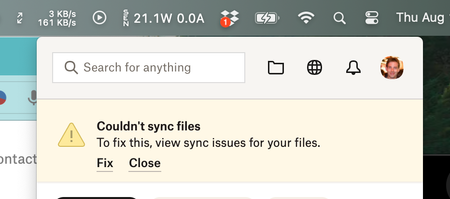
I'm currently seeing this
If I click on Fix, it shows me this
Then when I go to folder, it's unclear how to fix, going to Share as suggested
I just get ...
- 1 year ago
Could you try these steps to fix the syncing issue, and enable full disk access?

Jay Dropbox Community Moderator
1 year agoDropbox Community ModeratorHi @yaroslavvb, thanks for bringing this to our attention.
Upon some brief research, it appears that this file is generally used in GitHub, or in a Mac application.
Are you compiling files or saving Mac apps in the Dropbox folder itself? Do you have GitHub currently running, or is the Mac running the app from that folder somehow?
This will help me to assist further!

yaroslavvb
1 year agoNew member | Level 2
I'm doing neither of these things. When I installed Dropbox, I got a system prompt asking "Do you want to give Dropbox permission to access these files" and I clicked "No" by mistake, so they are getting Permission Denied.
Now I can't figure out how to undo these, and give Dropbox permission again
- Jay1 year ago
Could you try these steps to fix the syncing issue, and enable full disk access?
About Apps and Installations
Have a question about a Dropbox app or installation? Reach out to the Dropbox Community and get solutions, help, and advice from members.
The Dropbox Community team is active from Monday to Friday. We try to respond to you as soon as we can, usually within 2 hours.
If you need more help you can view your support options (expected response time for an email or ticket is 24 hours), or contact us on X, Facebook or Instagram.
For more info on available support options for your Dropbox plan, see this article.
If you found the answer to your question in this Community thread, please 'like' the post to say thanks and to let us know it was useful!


