Your workflow is unique 👨💻 - tell us how you use Dropbox here.
Forum Discussion

ck9
4 years agoExplorer | Level 4
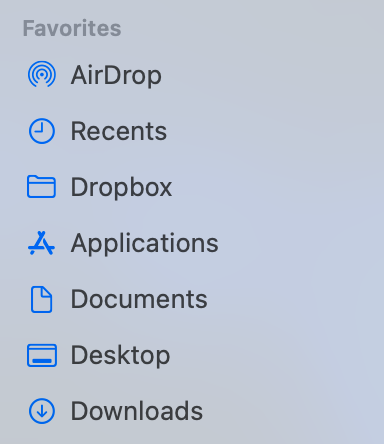
How to restore the Dropbox icon in the sidebar of Finder in macOS
As you see in this screenshot, I do have a shortcut for Dropbox in my Finder sidebar. But the folder icon is not Dropbox's original icon. I don't remember how this happened, but it has been like this...
- 4 years agoYou can try following the first few steps of the advanced installation to uninstall the desktop app.
However, since it's still running on your computer, could you go through your preferences and check the location of the Dropbox folder?

Lusil Dropbox Staff
4 years agoDropbox StaffYou can try following the first few steps of the advanced installation to uninstall the desktop app.
However, since it's still running on your computer, could you go through your preferences and check the location of the Dropbox folder?
However, since it's still running on your computer, could you go through your preferences and check the location of the Dropbox folder?

ck9
4 years agoExplorer | Level 4
It worked! Thanks!
- Lusil4 years agoGlad to hear that, ck9!
If anything else comes up in the future, don't hesitate to give us another nudge.
In the meantime, I hope you have a lovely day ahead of you!- phardy0073 years agoNew member | Level 2
I have the same situation. I no longer can access a shortcut on my favorites. I tried the steps for the uninstall and got to the terminal but then it wouldn't let me enter a password? Just got stuck with the password icon. Any ideas?


About Apps and Installations
Have a question about a Dropbox app or installation? Reach out to the Dropbox Community and get solutions, help, and advice from members.
The Dropbox Community team is active from Monday to Friday. We try to respond to you as soon as we can, usually within 2 hours.
If you need more help you can view your support options (expected response time for an email or ticket is 24 hours), or contact us on X, Facebook or Instagram.
For more info on available support options for your Dropbox plan, see this article.
If you found the answer to your question in this Community thread, please 'like' the post to say thanks and to let us know it was useful!


