Your workflow is unique 👨💻 - tell us how you use Dropbox here.
Forum Discussion

mikkif88
7 days agoHelpful | Level 5
I can't change the Dropbox web column headers
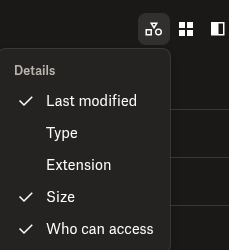
I was able to add Size header to my columns on Dropbox website last year sometime. But now when I go there to switch my List view column headers, I no longer get the inverted caret. However, I get it with Grid view and Large Grid view. Where did it go? It's the same in Safari as in Chrome.
Application Affected
Dropbox website
Device
MacBook Pro
Operating System/Browser (if using the web)
macOS Sequoia 15.7.4
Dropbox App Version (if using the app)
NA
5 Replies
Hi Jay -
I have no extensions running in the browsers. I also tested it out in Incognito and private on both Safari and Chrome. I also reset my browsers. Nothing has changed. I also tested it out on my laptop which is running macOS Tahoe 26.2 with it happening in both Safari and Firefox.
Just as a side note, this is happening in my DB Team account for my work. I also have my own personal DB account which I switch between the two. When I switch to the personal account, even though I had set the Size header on my team account, it shows up also in my personal account as well even though I hadn't set it there. I tried logging out of both and just logging into my personal DB account. I still don't get the inverted caret to click on the menu.
Thanks for looking into this.
- Jay7 days ago
Dropbox Community Moderator
Hi mikkif88, thanks for bringing this to our attention.
Do you have any extensions running in your browsers that could be affected the way the website is rendered on the screen?
Could you try using incognito/private browsing mode without any extensions running, clearing your cache and even resetting your browser entirely.
Keep me updated with any progress!


About Apps and Installations
Have a question about a Dropbox app or installation? Reach out to the Dropbox Community and get solutions, help, and advice from members.
The Dropbox Community team is active from Monday to Friday. We try to respond to you as soon as we can, usually within 2 hours.
If you need more help you can view your support options (expected response time for an email or ticket is 24 hours), or contact us on X, Facebook or Instagram.
For more info on available support options for your Dropbox plan, see this article.
If you found the answer to your question in this Community thread, please 'like' the post to say thanks and to let us know it was useful!


