Our Community is in read-only mode until April 8th, learn more here. You can still search existing threads or get help via Dropbox Support, the Dropbox Help Center, or Learn.
Forum Discussion

Benjamin Gordon
5 months agoHelpful | Level 7
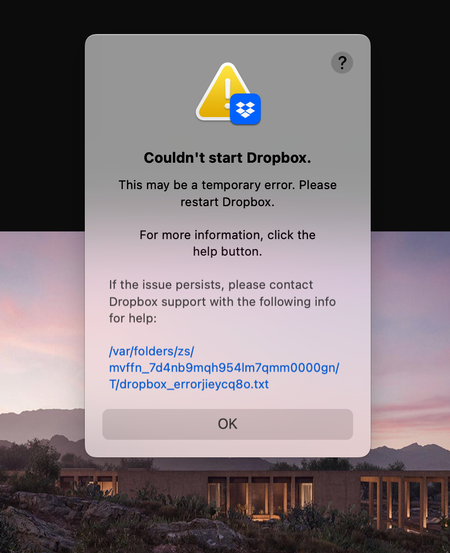
I see a "Couldn't start Dropbox" error on my macOS 15.7.1.
Application Affected
Dropbox Desktop App Max Device
M1 MAX MacBookPro Operating System/Browser (if using the web)
macOS 15.7.1 Dropbox App Version (if using the app)
235.4.5905
Q...

Benjamin Gordon
4 months agoHelpful | Level 7
bn.BUILD_KEY: Dropbox
bn.VERSION: 235.4.5905
bn.constants.WINDOWS_SHELL_EXT_VERSION: 87
bn.is_frozen: True
machine_id: 8687ac7e-37b2-5c12-9c58-c33dad885f1d
pid: 5701
ppid: 1
uid: 501
user_info: pwd.struct_passwd(pw_name='benjamingordon', pw_passwd='********', pw_uid=501, pw_gid=20, pw_gecos='Benjamin Gordon', pw_dir='/Users/benjamingordon', pw_shell='/bin/zsh')
effective_user_info: pwd.struct_passwd(pw_name='benjamingordon', pw_passwd='********', pw_uid=501, pw_gid=20, pw_gecos='Benjamin Gordon', pw_dir='/Users/benjamingordon', pw_shell='/bin/zsh')
euid: 501
gid: 20
egid: 20
group_info: grp.struct_group(gr_name='staff', gr_passwd='*', gr_gid=20, gr_mem=['root'])
effective_group_info: grp.struct_group(gr_name='staff', gr_passwd='*', gr_gid=20, gr_mem=['root'])
DYLD_LIBRARY_PATH: None
cwd: '/'
real_path='/'
mode=0o40755 uid=0 gid=0
parent mode=0o40755 uid=0 gid=0
HOME: '/Users/benjamingordon'
appdata: '/Users/benjamingordon/.dropbox/instance2'
real_path='/Users/benjamingordon/.dropbox/instance2'
mode=0o40700 uid=501 gid=20
parent mode=0o40755 uid=501 gid=20
dropbox_path: '/Users/benjamingordon/Dropbox'
real_path='/Users/benjamingordon/Dropbox'
mode=0o40755 uid=501 gid=20
parent mode=0o40755 uid=501 gid=20
sys_executable: '/Applications/Dropbox.app/Contents/MacOS/Dropbox'
real_path='/Applications/Dropbox.app/Contents/MacOS/Dropbox'
mode=0o100755 uid=501 gid=20
parent mode=0o40755 uid=501 gid=20
trace.__file__: '/Applications/Dropbox.app/Contents/Resources/python-packages.zip/dropbox/client/ui/common/boot_error.pyc'
real_path='/Applications/Dropbox.app/Contents/Resources/python-packages.zip/dropbox/client/ui/common/boot_error.pyc'
not found
parent not found
tempdir: '/var/folders/zs/mvffn_7d4nb9mqh954lm7qmm0000gn/T'
real_path='/private/var/folders/zs/mvffn_7d4nb9mqh954lm7qmm0000gn/T'
mode=0o40700 uid=501 gid=20
parent mode=0o40755 uid=501 gid=20
Traceback (most recent call last):
File "desktop/dropbox/client/main.py", line 1107, in wrapper
File "desktop/dropbox/client/main.py", line 8682, in finish_dropbox_boot
File "desktop/dropbox/client/message_queue.py", line 338, in _wrapped
File "desktop/dropbox/client/main.py", line 7965, in _init_components_for_account
File "desktop/dropbox/client/main.py", line 7873, in create_sync_engine
File "desktop/dropbox/sync_engine_boundary/factory.py", line 237, in make_sync_engine
File "desktop/dropbox/sync_engine/nucleus/classic_client/sync_engine.py", line 264, in __init__
File "desktop/dropbox/sync_engine/nucleus/classic_client/modern_client/modern_client.py", line 331, in __init__
File "desktop/dropbox/sync_engine/nucleus/classic_client/modern_client/base.py", line 279, in __init__
File "desktop/dropbox/sync_engine/nucleus/classic_client/thin_adapter/in_proc.py", line 244, in __init__
File "desktop/dropbox/sync_engine/nucleus/classic_client/thin_adapter/in_proc.py", line 622, in _init_new_engine_locked
File "desktop/dropbox/sync_engine/nucleus/thin_client/client.py", line 176, in __init__
File "desktop/extensions/nucleus/nucleus_python.pyx", line 77, in nucleus_python.NucleusSyncEngine.__cinit__
nucleus_python.SyncEngineError: "Initializing engine |>> Initializing filesystem |>> Attempting to register icons |>> unlinking errored icon |>> unlink syscall |>> FSErrorCode::PermissionDenied"
- Megan4 months ago
Dropbox Community Moderator
Hi Benjamin Gordon!
Just to make sure we're on the same page: you initially mentioned you've tried an advanced reinstall. Did you follow these steps?
If this didn't work, I'm going to need to send you an email, in order for us to have a closer look into this. Thanks!
- Benjamin Gordon4 months agoHelpful | Level 7
yep. literally tried everything multiple times
- Megan4 months ago
No worries Benjamin Gordon!
I just sent you an email, in order for us to have a closer look into this. Reply back to me, and we'll take it from there.
Thanks!

About Apps and Installations
Have a question about a Dropbox app or installation? Reach out to the Dropbox Community and get solutions, help, and advice from members.
The Dropbox Community team is active from Monday to Friday. We try to respond to you as soon as we can, usually within 2 hours.
If you need more help you can view your support options (expected response time for an email or ticket is 24 hours), or contact us on X, Facebook or Instagram.
For more info on available support options for your Dropbox plan, see this article.
If you found the answer to your question in this Community thread, please 'like' the post to say thanks and to let us know it was useful!


