Your workflow is unique 👨💻 - tell us how you use Dropbox here.
Forum Discussion

SRoyPC
5 years agoExplorer | Level 4
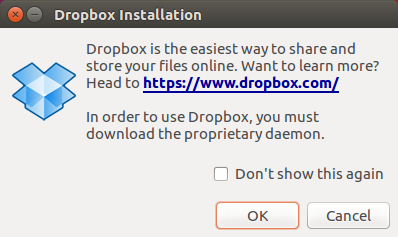
'In order to use Dropbox, you must download the proprietary daemon' shows up whenever the PC starts
Hello Team,
On Ubuntu 16.04 every time I start my PC, I'm greeted by the message 'In order to use Dropbox, you must download the proprietary daemon'.
Availing any of the options av...

Daphne Dropbox Community Moderator
5 years agoDropbox Community ModeratorHi there SRoyPC, thanks for reaching out to us here!
Can you let me know if the info here helps at all? Perhaps delaying the startup of the app might help with the error you're getting on system startup.
Let me know how it goes!
 SRoyPC5 years agoExplorer | Level 4
This is a work-in-progress. Thank you.
- SRoyPC5 years agoExplorer | Level 4
 briankhaney5 years agoNew member | Level 2
I got it to work for my Ubuntu 20.04 LTS workstation.
At the command line, run 'dropbox start -i'. The '-i' says to install the daemon if its not installed.
Reboot, login, and you should see a Dropbox icon in the System Tray. (I'm running Cinnamon for my desktop environment.)
Click on that Dropbox icon and you should see the things you can do.
Other things you can do at the command line: run 'man dropbox'.
 Plautdietscha Liehra1 year agoNew member | Level 2
Thank-you. This was very helpful ... got Dropbox going on my Tumbleweed.
About Apps and Installations
Have a question about a Dropbox app or installation? Reach out to the Dropbox Community and get solutions, help, and advice from members.
The Dropbox Community team is active from Monday to Friday. We try to respond to you as soon as we can, usually within 2 hours.
If you need more help you can view your support options (expected response time for an email or ticket is 24 hours), or contact us on X, Facebook or Instagram.
For more info on available support options for your Dropbox plan, see this article.
If you found the answer to your question in this Community thread, please 'like' the post to say thanks and to let us know it was useful!


