Need to see if your shared folder is taking up space on your dropbox 👨💻? Find out how to check here.
Forum Discussion

Shawn V.2
11 years agoNew member | Level 1
Ipad and Iphone viewing of long file names
Our company is having the issue that on the mobile app (using the ipad or iphone) often times the file name is too long to properly view what we are opening. I want to be able to read the entire file name so I know what i am opening since many of the beginning and last parts of the file are exactly the same for filing purposes so I want to be able to view the file name without having to open each one in order to find out. I'm hoping I make sense. Is there something I'm missing where I'm able to do this? I can't "right click" on the file name cause I'm mobile otherwise I would try that 🙂
Well, bugger me, Dropbox has finally fixed this with the latest update. I thought to re-check this today after the latest change, and straight away could see the filenames are displayed differently. The font is smaller, and the filename is truncated in the middle, so I can read the start of the file name, but also the end which is (with my file-naming convention), typically the differentiator. But the kicker is what happens with the display pane. It is now possible to close that — there’s a small “x” in the top left corner of the display/preview pane — and once that closes, the left pane with the file names expands to full screen view! And voila! I can now see the full long file names. Dropbox: THAT is the way to take advantage of the larger screen on an iPad, especially the 12.9” model. I’m still annoyed it took so long to remedy, but thank you for finally doing it.

112 Replies
Replies have been turned off for this discussion
 Duke9 years agoNew member | Level 2
That the iPad App is unable to clearly display even moderately long folder/file names renders it and Dropbox unusable. I am using a 12.9 iPad Pro, which has a good sized screen, but because Dropbox have chosen to squeeze the folder/file names viewer into a small portion of the left side of the app it is impossible to see what files are in the folders without individually clicking on each file to investigate. It is not possible to resize the folders/files viewer or display it in full screen.
Like many users I have many folders and files with long names - for my work they need to be named in this way. And not being able to quickly see the names of these files before opening them slows down my productivity considerably. I am a paying Dropbox user and now need to use it daily on an iPad. Unfortunately this App is not fit for purpose, and I am led to believe that Dropbox have no intention of fixing this issue. I will therefore have to move my business to another cloud service.
 Ben C.199 years agoNew member | Level 2
Wow. I thought I was just being technology challenged with the long file name issue (by long file name... I don't mean long... just anything over, say, 12 characters).
This really is weird that it's not fixed. :|
I did have a look at that Readdle app mentioned, but looks like you need to download a bunch of things - generally I avoid that preferring to use online. Oh well. So much for trying to use my iPad for everything :)
 lcsv9 years agoHelpful | Level 5
I found this thread after getting extremely aggravated trying to quickly find a Dropbox file on my iPad. After reading all of the comments and coming to the realization that there is no fix for this seemingly simple to fix problem (and it doesn't look like anyone at Dropbox cares), I found an app called 'File Manager' and it's free. It worked for displaying my full dropbox file names. Not sure it would work for a business but, for a personal user, it did the trick. It's sad that Dropbox is forcing us to go to third party applications instead of just fixing the problem.
- jhsueh9 years agoNew member | Level 2
I am unable to read the longer file names that I've uploaded onto Dropbox. Even when I turn my iPad to landscape format, it is still not able to read them completely. Is there a way to re-adjust that so it is possible?
- Mark9 years ago
Super User II
No there isnt I'm afraid.
It is (annoyingly), however, a commonly requested feature.  lascafeteras9 years agoNew member | Level 2
We are having the same issue some of you have been having for years. Dropbox what's the word?
- Steven B.319 years agoHelpful | Level 5
I think the short to medium term solution is the new Files app in iOS 11. :)
https://www.apple.com/ios/ios-11-preview/
(edit to add: As an immediate bandaid fix, I suggest Readdle's Documents app.)
 heikkipekka9 years agoHelpful | Level 6
- I can't see the full filename of a file
- I can't see the full date of a file
What's going on? Who thought this is a good idea on iPad?
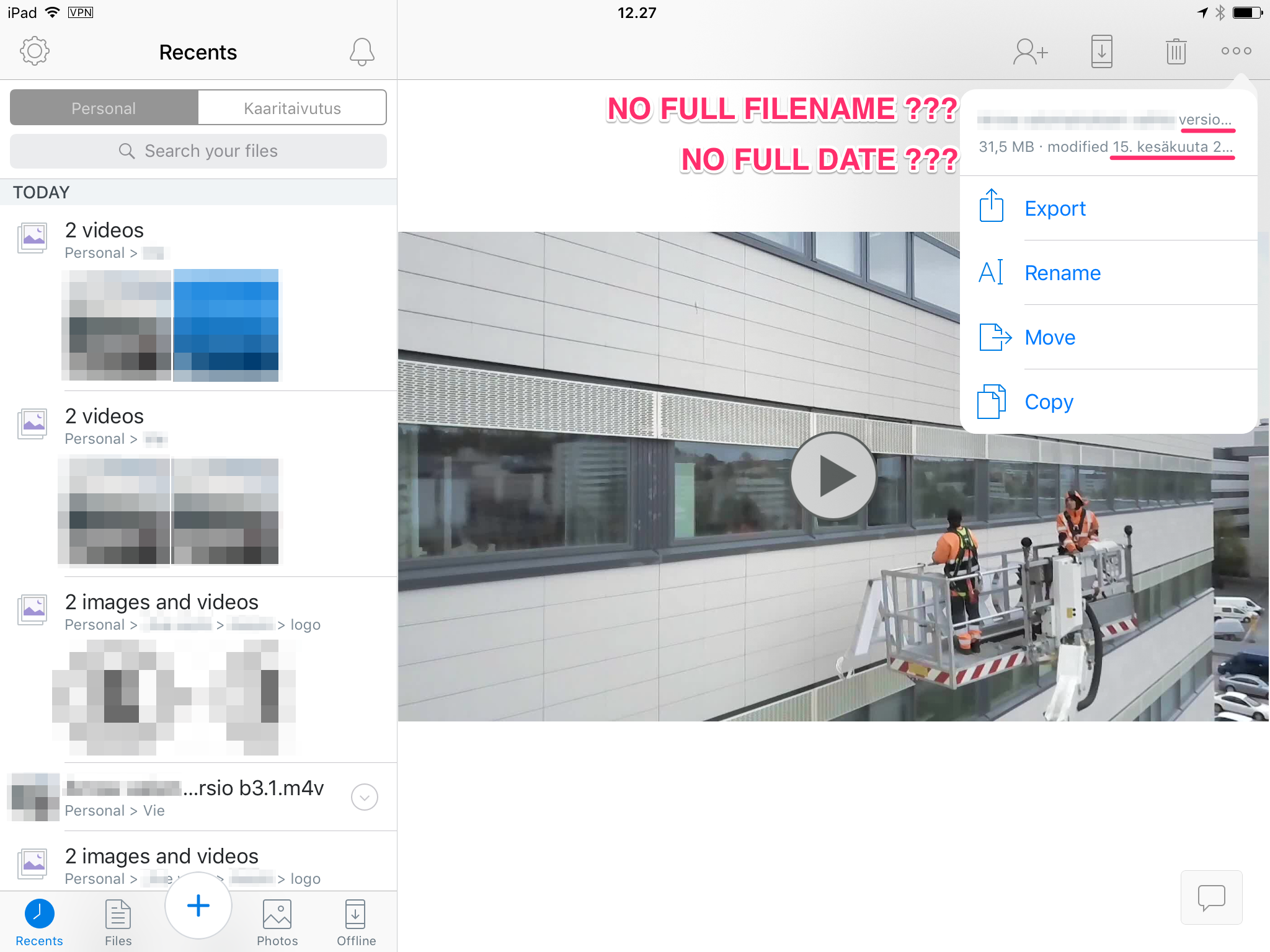
- adecinque9 years agoNew member | Level 2
I use Dropbox for work. I am a lawyer, and I store many files with somewhat long names. The filename include details like docket name, filing party, relief requested, date, etc. The names aren't crazy long, but they aren't short either. Example:
0023 1st Am. Complaint (Jan. 1, 2017).pdf
0024 Defendant Squiggle's Mot. to Dismiss (Jan. 10, 2017).pdf
0025 Plaintiff's Br. IOT Mot. to Dimsiss (Feb. 1, 2017).pdf
0026 Defendant's Mot. for Expedited Discovery (Feb. 10, 2017).pdf
0027 Plaintiff's Br. IOT Mot. for Expedited Discover (Feb. 20, 2017).pdf
The problem is that when I look at a folder of files on the iPad, the names are truncated. I see the first few characters of the name, then ..., then the last few characters. That is not enough information; all my filenames have similar beginnings and endings, so I see something like this:
0023 1st ... 1, 2017).pdf
0024 Def ... 0, 2017).pdf
0025 Pla ... 1, 2017).pdf
0026 Def ... 0, 2017).pdf
0027 Pla ... 0, 2017).pdf
In this view, I can't tell what file I need and have to keep clicking around until I find it. The search function isn't much help because the names are all somewhat similar. Also, I might have hundreds of files in a folder.
I see no way to increase the space allotted for names (perhaps by moving the divider between the files and the viewing window). Nor do I see a way to shrink the size of the text or to scroll through the name.
Is there a way to view the whole file name when looking at a folder of files on the iPad? If not, could you please add this feature? Thank you.
- Tom H.219 years agoNew member | Level 2The problem with Documents 5 is that you can't have "favorites" (bookmarked documents). So it's only half a help.

About Apps and Installations
Have a question about a Dropbox app or installation? Reach out to the Dropbox Community and get solutions, help, and advice from members.
The Dropbox Community team is active from Monday to Friday. We try to respond to you as soon as we can, usually within 2 hours.
If you need more help you can view your support options (expected response time for an email or ticket is 24 hours), or contact us on X, Facebook or Instagram.
For more info on available support options for your Dropbox plan, see this article.
If you found the answer to your question in this Community thread, please 'like' the post to say thanks and to let us know it was useful!


