Our Community is in read-only mode until April 8th, learn more here. You can still search existing threads or get help via Dropbox Support, the Dropbox Help Center, or Learn.
Forum Discussion

PaulSon
2 years agoHelpful | Level 6
MacOS Sonoma 14.1 constant high CPU by process DropboxFileProvider
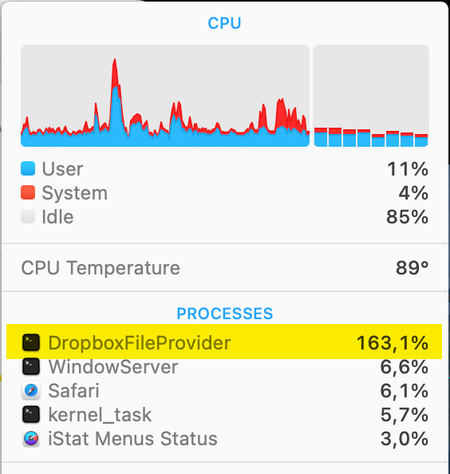
I'm using the latest version of Dropbox (v186.4.2607) on my MacBook Pro (2,4 GHz 8-Core Intel Core i9) that is running macOS Sonoma 14.1. Lately I've noticed that Dropbox is having a high cpu (150 -...

Megan Dropbox Community Moderator
2 years agoDropbox Community Moderator
PaulSon
2 years agoHelpful | Level 6
- Dropbox is syncing a large number of files
Nope, usually less then 50 files - Other apps interfere with sync
I don't have an anti-virus app. Time machine isn't running when the CPU is still very high. - Files in your Dropbox folder have the wrong permissions
Dropbox has Full Disk Access - The Dropbox folder is installed on a NAS device
No, the Dropbox folder is on the SSD in my MacBook Pro - Your device doesn’t support extended attributes
All metadata is available in Dropbox and the Dropbox folder is on a supported file system (APFS-formatted hard drive)
According to the checks above everything seems to be ok but Dropbox is still having a very high CPU and won't stop syncing after all the files have been synced.
I have paused Dropbox and will only let I run when the lid is open and I'm logged into the Mac.
Very annoying problem!
- Megan2 years ago
Hi PaulSon, in that case, can I send you an email, in order for us to have a closer look into this?
- PaulSon2 years agoHelpful | Level 6
Hi Megan
Yes you can send me an email. Anything that helps to solve this issue is welcome.
Today I noticed that 3 files are probably causing the problem.
These 3 files won't sync every time after all the other files are synced.
I only know that there are 3 files. Can I somehow found out the names and the location of these 3 files?- Megan2 years ago
Hey guys, I just sent you both an email!
I'll see you there, thank you!
About Apps and Installations
Have a question about a Dropbox app or installation? Reach out to the Dropbox Community and get solutions, help, and advice from members.
The Dropbox Community team is active from Monday to Friday. We try to respond to you as soon as we can, usually within 2 hours.
If you need more help you can view your support options (expected response time for an email or ticket is 24 hours), or contact us on X, Facebook or Instagram.
For more info on available support options for your Dropbox plan, see this article.
If you found the answer to your question in this Community thread, please 'like' the post to say thanks and to let us know it was useful!


