We’re Still Here to Help (Even Over the Holidays!) - find out more here.
Forum Discussion

qingliang
11 months agoNew member | Level 1
Missing syncing icons using Ubuntu 24.04 and can't make files online only.
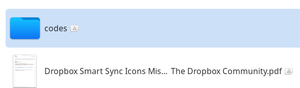
I use Ubuntu 24.04; the file is Nautilus. There is no file sync icon but a icon as is shown in the photo. and I cannot make the file online only. Can someone help me? Thanks a lot.

qingliang
11 months agoNew member | Level 1
Hi Megan,
Thanks for your reply. Below is my Dropbox version info. I did try uninstalling and re-installing the app, which didn't help.
Dropbox daemon version: 215.4.7202
Dropbox command-line interface version: 2024.04.17

Nancy Dropbox Community Moderator
11 months agoDropbox Community ModeratorHi from me too, qingliang! Please keep in mind that the ability to make files online-only on the desktop app is currently only available for Windows and Mac users.
As for the sync icons you mention though, do you mean that you’re not seeing any of the icons that are listed in this Help Center article? Are you seeing this triangle for all of your files/folders?
Feel free to send me a full screenshot of what you see in your local Dropbox folder (just hide anything that you don’t want publicly visible on the forum).
- qingliang11 months agoNew member | Level 1
Hi Nancy, thanks for your reply. Finally, I figured out that the KDE theme I am using does not work well with Dropbox. It worked well after I changed the KDE theme to another. Thanks for all the replies. Sorry, I am not sure how to close this discussion......

About Apps and Installations
Have a question about a Dropbox app or installation? Reach out to the Dropbox Community and get solutions, help, and advice from members.
The Dropbox Community team is active from Monday to Friday. We try to respond to you as soon as we can, usually within 2 hours.
If you need more help you can view your support options (expected response time for an email or ticket is 24 hours), or contact us on X, Facebook or Instagram.
For more info on available support options for your Dropbox plan, see this article.
If you found the answer to your question in this Community thread, please 'like' the post to say thanks and to let us know it was useful!


