We’re Still Here to Help (Even Over the Holidays!) - find out more here.
Forum Discussion

5puj47980xk
6 months agoNew member | Level 2
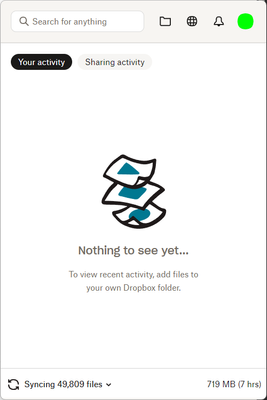
My entire Dropbox content is being re-synced, and I have no idea why.
Today DB choose to re-sync the entire folder from the beginning
os: windows
time wasted: unknow

Jayson L.
6 months agoHelpful | Level 7
Probably related to the recent update for the Windows application. They've changed the appearance of things in your Dropbox folder. The sync status icons are no longer overlays on the program icon, but shown in a separate column unto itself now. As a result, for some reason, the application has to re-sync everything. I don't know why. It did the same thing to me after the update to version 227.x.x.
I'm still having issues with the sync status icons reflecting correctly in my folder, and I have an open thread on that topic. I really hope they can fix this, because I accidentally got a taste of this earlier on when (I think) it was in beta, and I was like, "this is going to be a mess."
Lo and behold...
About Apps and Installations
Have a question about a Dropbox app or installation? Reach out to the Dropbox Community and get solutions, help, and advice from members.
The Dropbox Community team is active from Monday to Friday. We try to respond to you as soon as we can, usually within 2 hours.
If you need more help you can view your support options (expected response time for an email or ticket is 24 hours), or contact us on X, Facebook or Instagram.
For more info on available support options for your Dropbox plan, see this article.
If you found the answer to your question in this Community thread, please 'like' the post to say thanks and to let us know it was useful!


