Your workflow is unique 👨💻 - tell us how you use Dropbox here.
Forum Discussion

DG44
20 hours agoExplorer | Level 4
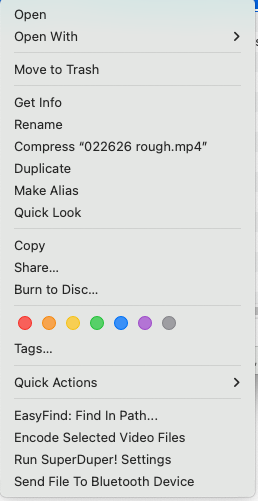
No 'Copy Dropbox Link' menu option, no green checkboxes, on Dropbox Desktop app for Mac
Sorry, this is going to be a little long, but I want to give you all the info you might need. Thanks in advance if you can figure out the problem
I'm on a 2023 Mac Mini M2 running OS 15.7.1 (Sequoi...

Hannah Dropbox Community Moderator
15 hours agoDropbox Community ModeratorHi there, DG44, thanks for bringing this to our attention.
Let's see what we can find.
First thing I'd like you to check is the sync status and version of the Dropbox app. You can do so by hovering over the small Dropbox icon in your menu bar.
Let me know if the icon isn't even there, because it sounds like your app might not be working as normal.
Also, is the app otherwise syncing? Meaning, if you add a test file in the Dropbox folder, for example, will it sync to your account on the web?
Let me know what you find and we'll go from there.
 DG447 hours agoExplorer | Level 4
Thank you for the reply, Hannah. The version showing when I hover over the Dropbox icon is 243.4.6956 and says "up to date".
As for syncing, when I click the menubar Dropbox icon and the window pops up, it has a checkmark on the bottom where it also says "Your files are up to date". And yes, the file I tried yesterday did sync. I dragged a short text file from my Desktop to the Dropbox folder in my Mac's sidebar, and it shows up immediately on the web. In fact, I tried it first by just dragging it in, but it moved the file rather than copying it, so I undid that move and option-dragged into the folder and it copied it properly, leaving the original on my Desktop.
About Apps and Installations
Have a question about a Dropbox app or installation? Reach out to the Dropbox Community and get solutions, help, and advice from members.
The Dropbox Community team is active from Monday to Friday. We try to respond to you as soon as we can, usually within 2 hours.
If you need more help you can view your support options (expected response time for an email or ticket is 24 hours), or contact us on X, Facebook or Instagram.
For more info on available support options for your Dropbox plan, see this article.
If you found the answer to your question in this Community thread, please 'like' the post to say thanks and to let us know it was useful!


