Our Community is in read-only mode until April 8th, learn more here. You can still search existing threads or get help via Dropbox Support, the Dropbox Help Center, or Learn.
Forum Discussion

sewkat
1 year agoExplorer | Level 3
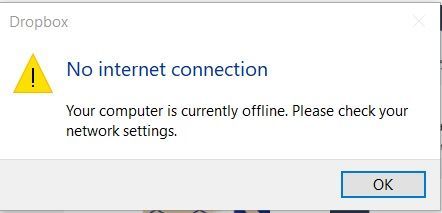
"No internet connection" error on my PC Dropbox - won't finish installing
Since the middle of August I've been having problems with my dropbox on my 3 devices not syncing. Now I've lost dropbox from my pc laptop. I've uninstalled, rebooted computer, reinstalled. It won't f...

sewkat
1 year agoExplorer | Level 3
Didn't work. Still the same problem.

Nancy Dropbox Community Moderator
1 year agoDropbox Community ModeratorHi from me too, sewkat! If you go to your Security tab here, how many devices do you see currently linked to your Dropbox account?
Have you also tried downloading and installing the Dropbox app via our offline installer here?
- sewkat1 year agoExplorer | Level 3
I only have 2 devices listed. My laptop isn't one of them.
I just tried the other download link you sent. It downloaded fine, still won't finish install, as it still says I have no internet connection. Do I have to a hard wired connection? instead of wi-fi?
- Nancy1 year ago
Thanks for trying that out! As the next step, I suggest performing an advanced reinstall.
Let me know if this doesn’t resolve the issue either.
- sewkat1 year agoExplorer | Level 3
Tried that too. Didn't work either.
I'm about ready to give up, getting dropbox back on my laptop. It won't install without an internet connection.
- sewkat1 year agoExplorer | Level 3
My phone and my kindle are connected to dropbox and they are now syncing.
I tried the offline installer. Same problem, says no internet connection.
About Apps and Installations
Have a question about a Dropbox app or installation? Reach out to the Dropbox Community and get solutions, help, and advice from members.
The Dropbox Community team is active from Monday to Friday. We try to respond to you as soon as we can, usually within 2 hours.
If you need more help you can view your support options (expected response time for an email or ticket is 24 hours), or contact us on X, Facebook or Instagram.
For more info on available support options for your Dropbox plan, see this article.
If you found the answer to your question in this Community thread, please 'like' the post to say thanks and to let us know it was useful!


