Our Community is in read-only mode until April 8th, learn more here. You can still search existing threads or get help via Dropbox Support, the Dropbox Help Center, or Learn.
Forum Discussion

sewkat
1 year agoExplorer | Level 3
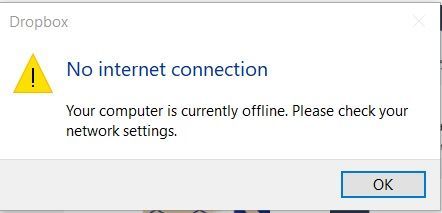
"No internet connection" error on my PC Dropbox - won't finish installing
Since the middle of August I've been having problems with my dropbox on my 3 devices not syncing. Now I've lost dropbox from my pc laptop. I've uninstalled, rebooted computer, reinstalled. It won't f...

sewkat
1 year agoExplorer | Level 3
Tried that too. Didn't work either.
I'm about ready to give up, getting dropbox back on my laptop. It won't install without an internet connection.

Nancy Dropbox Community Moderator
1 year agoDropbox Community ModeratorLet's try a few more things together. Can you flush the DNS cache on one of the affected devices as the next step, reboot your router, and disconnect/reconnect to the network you're using on that device?
After that, I’d like you to install the Dropbox desktop app one more time using the offline installer (a new stable version has been released in the meantime, so this may help).
- sewkat1 year agoExplorer | Level 3
what is the DNS cache? How do I flush it?
- Hannah1 year ago
Hey sewkat, these are the steps I found online:
- Click the Start button.
- Click All Programs > Accessories.
- Select Command Prompt.
- In the command prompt window, type ipconfig /flushdns.
- Press Enter.
- You should see a message confirming that the DNS Resolver Cache was successfully flushed
- sewkat1 year agoExplorer | Level 3
I'm running Windows 10.
I can click the start button, but I don't have any of the other commands.
No All Program>Accessories.
- sewkat1 year agoExplorer | Level 3
Okay found it. flushed. Now what?

About Apps and Installations
Have a question about a Dropbox app or installation? Reach out to the Dropbox Community and get solutions, help, and advice from members.
The Dropbox Community team is active from Monday to Friday. We try to respond to you as soon as we can, usually within 2 hours.
If you need more help you can view your support options (expected response time for an email or ticket is 24 hours), or contact us on X, Facebook or Instagram.
For more info on available support options for your Dropbox plan, see this article.
If you found the answer to your question in this Community thread, please 'like' the post to say thanks and to let us know it was useful!


