Your workflow is unique 👨💻 - tell us how you use Dropbox here.
Forum Discussion

KobusMe
3 years agoExplorer | Level 3
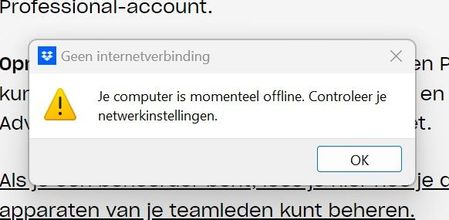
No internet connection
Dropbox states that I have no internetconnection ..... BUT I have.
HELP (im not a computerwizzard)
10 times reinstall
Virusscanner disabelled
Windows
HPdesktop
- 3 years ago
When you reinstalled the app, did you perform an advanced reinstallation of the app, or a basic reinstall from the site?

KobusMe
3 years agoExplorer | Level 3
My home internet. Ethernet 1000Mbits and wifi. Both don't work

Jay Dropbox Community Moderator
3 years agoDropbox Community ModeratorWhen you reinstalled the app, did you perform an advanced reinstallation of the app, or a basic reinstall from the site?
- KobusMe3 years agoExplorer | Level 3
Hello Jay,
I don't know how but it works now!!! Yeahhhh 😀
Thanks for te help.
Greetings Kobus
 nicowijaya882 years agoExplorer | Level 4
well now i got the problem
i already tried re-install but nothing happen. i use windows server, when i tried to install in windows 7 it works. is it currently dropbox has an issue with windows server?
- Walter2 years ago
Hey nicowijaya88, sorry to hear about this.
I just wanted to mention that hosting the Dropbox desktop app on a server, such as a Windows Server OS, isn’t supported by Dropbox. You can, however, host the Dropbox desktop app on a computer that’s also running a server.
I know it's not much, but I hope this clears things up.
 JAZMINZITA2 years agoNew member | Level 2
La aplicación de Drophox de repente dejo de sincronizar y me dice que no tengo conexión a internet cuando si tengo.
Ayuda, que puedo hacer?

About Apps and Installations
Have a question about a Dropbox app or installation? Reach out to the Dropbox Community and get solutions, help, and advice from members.
The Dropbox Community team is active from Monday to Friday. We try to respond to you as soon as we can, usually within 2 hours.
If you need more help you can view your support options (expected response time for an email or ticket is 24 hours), or contact us on X, Facebook or Instagram.
For more info on available support options for your Dropbox plan, see this article.
If you found the answer to your question in this Community thread, please 'like' the post to say thanks and to let us know it was useful!


