Our Community is in read-only mode until April 8th, learn more here. You can still search existing threads or get help via Dropbox Support, the Dropbox Help Center, or Learn.
Forum Discussion

cdwilson
1 year agoNew member | Level 1
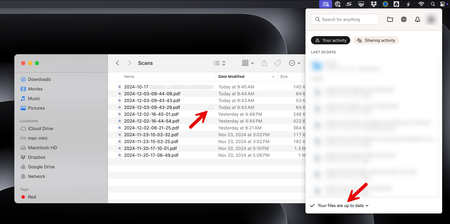
Some files are stuck on"waiting to upload" and never sync on macOS unless I double click them.
When adding files to my Dropbox folder on my Mac, I occasionally see some files which appear in the Finder with a dotted line cloud icon in the state "waiting to upload". These files will never sync ...

Megan Dropbox Community Moderator
1 year agoDropbox Community ModeratorHey cdwilson, thanks for all the details!
Based on what you described, it sounds like it has to do with ScanSnap and the app's settings upon creating the files in your Dropbox folder.
Have you tried contacting them by any chance?
However, give me some time to check internally with our Team about this, and I'll let you know more.

cdwilson
1 year agoNew member | Level 1
Hi Megan
As far as I can tell, ScanSnap is just creating normal files under the Dropbox "Family Room" directory.
The only difference I can see between files created by ScanSnap vs. file created manually by myself is the permissions group is set to "wheel" for files created by ScanSnap, while the group is set to "staff" for files I create manually.
On the mac mini, the logged in user is a "Standard" user (not an Administrator). As far as I know, this all shouldn't make any difference, but I figured I'd mention it in case it matters.
Since the whole process works most of the time, I'm wondering if maybe there is some kind of timing/race condition issue that is happening due to the fact that the files are being created (and possibly renamed) quickly by a program, rather than manually by a human.
Is there any kind of logging or debug I can enable in the Dropbox app that might help to see why this is happening?
- cdwilson1 year agoNew member | Level 1
Hi Megan
In case you want to share with your internal team, here's the sequence of file system events when ScanSnap saves a scanned PDF document in the Dropbox folder:
<redacted>@<redacted> Downloads % ./fswatch -x /Users/<redacted>/Library/CloudStorage/Dropbox/Family\ Room/Scans /Users/<redacted>/Library/CloudStorage/Dropbox/Family Room/Scans/CheckFolderValid0000000000 Created IsFile Removed /Users/<redacted>/Library/CloudStorage/Dropbox/Family Room/Scans/1E50072C-065E-45B4-BD1A-C383B63EFD39/A Created IsDir Removed /Users/<redacted>/Library/CloudStorage/Dropbox/Family Room/Scans/1E50072C-065E-45B4-BD1A-C383B63EFD39 Created IsDir Removed /Users/<redacted>/Library/CloudStorage/Dropbox/Family Room/Scans/2024-12-04-16-11-18.pdf Created IsFile Link /Users/<redacted>/Library/CloudStorage/Dropbox/Family Room/Scans/2024-12-04-16-11-18.pdf AttributeModified IsFile Link /Users/<redacted>/Library/CloudStorage/Dropbox/Family Room/Scans/2024-12-04-16-11-18.pdf AttributeModified IsFile AttributeModified Link /Users/<redacted>/Library/CloudStorage/Dropbox/Family Room/Scans/2024-12-04-16-11-18.pdf AttributeModified IsFile AttributeModified Link- Megan1 year ago
Hey cdwilson, if you quit/relaunch the app without clicking on the files first, do they still appear as "waiting to sync"?
Also, have you noticed this behavior specifically for files in the Dropbox Family Room, or does it happen regardless of the folder destination?
About Apps and Installations
Have a question about a Dropbox app or installation? Reach out to the Dropbox Community and get solutions, help, and advice from members.
The Dropbox Community team is active from Monday to Friday. We try to respond to you as soon as we can, usually within 2 hours.
If you need more help you can view your support options (expected response time for an email or ticket is 24 hours), or contact us on X, Facebook or Instagram.
For more info on available support options for your Dropbox plan, see this article.
If you found the answer to your question in this Community thread, please 'like' the post to say thanks and to let us know it was useful!


