Our Community is in read-only mode until April 8th, learn more here. You can still search existing threads or get help via Dropbox Support, the Dropbox Help Center, or Learn.
Forum Discussion

fitzLAP
1 month agoExplorer | Level 3
Sync updated; all files showing on desktop app as 0 bytes
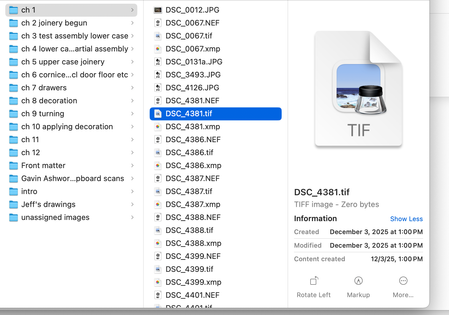
I had to restore my MacBook Pro's OS (15.7.4), then re-install DB desktop app (did it several time to try to fix problem, in fact). All files are showing 0 bytes. I can open them one by one, ...

Dell_Dropbox Community Manager
1 month agoCommunity ManagerWelcome to the community fitzLAP
Your Dropbox files are currently online-only placeholders, which can show as 0 bytes on macOS until they download. The quickest fix is to right-click the folder (or select multiple files) in Finder and choose Make available offline. If that option is missing, you can also re-enable local syncing via Selective Sync in Dropbox Preferences.
You can find steps and details here, try this out and let us know if it works

fitzLAP
1 month agoExplorer | Level 3
The right-click option doesn't show (see screenshot above). I've tried several times (including just now) to change/re-enable selective sync.
About Apps and Installations
Have a question about a Dropbox app or installation? Reach out to the Dropbox Community and get solutions, help, and advice from members.
The Dropbox Community team is active from Monday to Friday. We try to respond to you as soon as we can, usually within 2 hours.
If you need more help you can view your support options (expected response time for an email or ticket is 24 hours), or contact us on X, Facebook or Instagram.
For more info on available support options for your Dropbox plan, see this article.
If you found the answer to your question in this Community thread, please 'like' the post to say thanks and to let us know it was useful!


