Our Community is in read-only mode until April 8th, learn more here. You can still search existing threads or get help via Dropbox Support, the Dropbox Help Center, or Learn.
Forum Discussion

TBat
3 years agoExplorer | Level 4
System Tray Window shrinks every time I open it
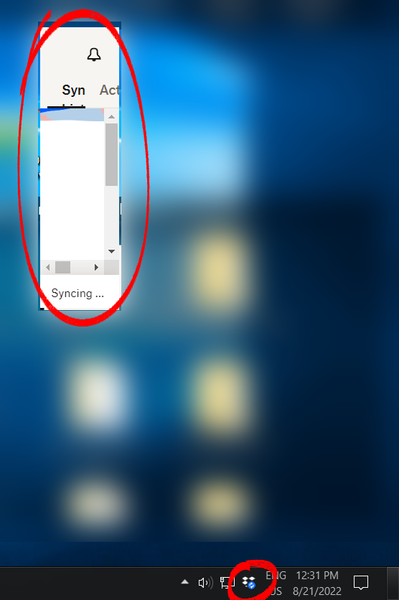
This started happening out of nowhere today. The system tray window continually shrinks from its bottom-right corner every time I open it. I can't resize the window and after 5 or 6 clicks it's s...
- 2 years ago
Hi Darryl!
We've addressed those issues in our recent Beta Builds, and we anticipate that it will function smoothly in the next stable version (expected in the upcoming week).
Let us know if you can still spot this issue after upgrading it.
Thanks.

dvanable
2 years agoHelpful | Level 6
Megan, yes please. Do you have it from my account info?
Dave

Hannah Dropbox Community Moderator
2 years agoDropbox Community ModeratorHi Darryl!
We've addressed those issues in our recent Beta Builds, and we anticipate that it will function smoothly in the next stable version (expected in the upcoming week).
Let us know if you can still spot this issue after upgrading it.
Thanks.
- tijana2 years agoHelpful | Level 5
I still have this issue and as You said it was supposed to be resolved over a month ago...?
- darrylschick2 years agoCollaborator | Level 9
Thank you for resolving these issues
- Walter2 years ago
Hey tijana, could you try the latest version of the app from this page and let us know how it goes?
- darrylschick2 years agoCollaborator | Level 9
Hannah I had the same problem today with what I believe is the current version. The top icons disappeared.
After forcing the app closed and restarting, I have this version:
- Hannah2 years ago
Hey darrylschick, thanks for letting us know.
Can you please run the latest installer here, to see if that helps?
If not, try restarting your computer as well and let me know how it goes.
- tijana2 years agoHelpful | Level 5
It is resolved, I think two days, after I wrote here. Thank You


About Apps and Installations
Have a question about a Dropbox app or installation? Reach out to the Dropbox Community and get solutions, help, and advice from members.
The Dropbox Community team is active from Monday to Friday. We try to respond to you as soon as we can, usually within 2 hours.
If you need more help you can view your support options (expected response time for an email or ticket is 24 hours), or contact us on X, Facebook or Instagram.
For more info on available support options for your Dropbox plan, see this article.
If you found the answer to your question in this Community thread, please 'like' the post to say thanks and to let us know it was useful!


