Our Community is in read-only mode until April 8th, learn more here. You can still search existing threads or get help via Dropbox Support, the Dropbox Help Center, or Learn.
Forum Discussion

sspilleman
1 month agoHelpful | Level 6
The app seems to be crashing on macOS Tahoe 26.4 (Beta 1)
Application Affected
Dropbox
Device
mac studio
Operating System/Browser (if using the web)
macOS 26.4 Beta 1
Dropbox App Version (if using the app)
241.4.4853
Question or Issue
Dropbox is crashing since I installed macOS Tahoe 26.4 (Beta 1) this morning. The errormessage is:
DYLD_LIBRARY_PATH: None
cwd: '/'
     real_path='/'
           	mode=0o40755	uid=0	gid=0
     parent	mode=0o40755	uid=0	gid=0
HOME: '/Users/sander'
appdata: '/Users/sander/.dropbox/instance3'
         real_path='/Users/sander/.dropbox/instance3'
               	mode=0o40700	uid=501	gid=20
         parent	mode=0o40755	uid=501	gid=20
dropbox_path: '/Volumes/Data/.CloudStorage/Data/Dropbox'
              real_path='/Volumes/Data/.CloudStorage/Data/Dropbox'
                    	mode=0o40700	uid=501	gid=20
              parent	mode=0o40755	uid=501	gid=20
sys_executable: '/Applications/Dropbox.app/Contents/MacOS/Dropbox'
                real_path='/Applications/Dropbox.app/Contents/MacOS/Dropbox'
                      	mode=0o100755	uid=501	gid=20
                parent	mode=0o40755	uid=501	gid=20
trace.__file__: '/Applications/Dropbox.app/Contents/Resources/python-packages.zip/dropbox/client/ui/common/boot_error.pyc'
                real_path='/Applications/Dropbox.app/Contents/Resources/python-packages.zip/dropbox/client/ui/common/boot_error.pyc'
                      	not found
                parent	not found
tempdir: '/var/folders/v5/1fn_t3055sd904vr0bg75ts40000gn/T'
         real_path='/private/var/folders/v5/1fn_t3055sd904vr0bg75ts40000gn/T'
               	mode=0o40700	uid=501	gid=20
         parent	mode=0o40755	uid=501	gid=20

Traceback (most recent call last):
  File "desktop/dropbox/fs_api/lifecycle.py", line 238, in client
  File "desktop/dropbox/fs_api/lifecycle.py", line 297, in _create_thin_client
  File "desktop/dropbox/fs_api/fs_api_adapter.py", line 54, in __init__
  File "desktop/extensions/fs_api/fs_api_python.pyx", line 63, in fs_api_python.FsApiServer.__cinit__
fs_api_python.FsApiError: "Initializing fs api |>> Initializing platform |>> Opening worker root directory |>> open syscall |>> FSErrorCode::PermissionDenied"

The above exception was the direct cause of the following exception:

Traceback (most recent call last):
  File "desktop/dropbox/client/main.py", line 1106, in wrapper
  File "desktop/dropbox/client/main.py", line 8849, in finish_dropbox_boot
  File "desktop/dropbox/client/message_queue.py", line 338, in _wrapped
  File "desktop/dropbox/client/main.py", line 8130, in _init_components_for_account
  File "desktop/dropbox/client/main.py", line 8038, in create_sync_engine
  File "desktop/dropbox/sync_engine_boundary/factory.py", line 237, in make_sync_engine
  File "desktop/dropbox/sync_engine/nucleus/classic_client/sync_engine.py", line 264, in __init__
  File "desktop/dropbox/sync_engine/nucleus/classic_client/modern_client/modern_client.py", line 330, in __init__
  File "desktop/dropbox/sync_engine/nucleus/classic_client/modern_client/base.py", line 260, in __init__
  File "../mac_arm64_dropbox_virtual_env/lib/python3.8/functools.py", line 967, in __get__
  File "desktop/dropbox/fs_api/lifecycle.py", line 267, in client
dropbox.fs_api.lifecycle.FsApiClientCreationException: "Initializing fs api |>> Initializing platform |>> Opening worker root directory |>> open syscall |>> FSErrorCode::PermissionDenied"
24 Replies
Replies have been turned off for this discussion
- Megan1 month ago
Dropbox Community Moderator
Hi there, sspilleman, welcome to our Community!
How long has this been happening for? Can you try an advanced reinstall using the steps provided in this Help Center article?
I'll be waiting for your updates!
 sspilleman1 month agoHelpful | Level 6
Hi Megan, thanks,
For me the problem immediately occurred right after login after updating to Tahoe 26.4 (Beta 1). This update was already available for a couple of days but I only decided to update this morning. The article you are referring to is covering windows, Im on a mac.
I already tried removing the application (/Applications/Dropbox.app) and reinstalling it before creating this ticket.
Sander
- Hannah1 month ago
Hey sspilleman, I hope I can jump in here as well.
The article Megan linked in her reply includes steps for Mac computers as well.
You'll find the option to switch from the Windows steps to the Mac ones right above the Windows steps:
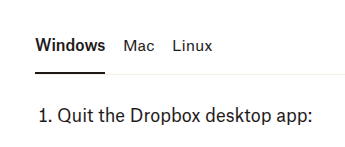
I hope this helps!
- sspilleman1 month agoHelpful | Level 6
I'll await the fix, I already reinstalled. 100% convinced this is related to the macOS update
- Hannah1 month ago
Hey sspilleman, since this is a permissions error which indeed could have been caused by your OS update, it's very unlikely to resolve itself.
That's why I've gone ahead and sent you an email, so we can investigate this further.
- sspilleman1 month agoHelpful | Level 6
I meant it will be resolved by a future update to the application, not by itself
- Emma1 month ago
Community Manager
Hi sspilleman thanks for reporting this. Our engineering team are aware and investigating, I'll report back once we have an update.
 michael_wohl1 month agoExplorer | Level 4
This just happened to me as well after I installed the latest 26.4 Beta OS update.
- sspilleman1 month agoHelpful | Level 6
Still exists afte the latest 26.4 beta update (25E5218f). I also just tried installing the latest dropbox client. Still broken
- LynnDbx1 month ago
Dropbox Engineer
Hi sspilleman. I'm from the Dropbox engineering team. We've been investigating this issue and early findings suggest that external drives are becoming read-only upon update to macOS 26.4 Beta. This prevents the Dropbox app from working correctly if your Dropbox folder is stored on the external drive as we don't have the permissions to make necessary changes to files within your Dropbox folder. We're currently escalating with Apple and hoping for a fix on their side.
Please let us know if you are experiencing this issue while your Dropbox folder is on the default volume of your device.


About Apps and Installations
Have a question about a Dropbox app or installation? Reach out to the Dropbox Community and get solutions, help, and advice from members.
The Dropbox Community team is active from Monday to Friday. We try to respond to you as soon as we can, usually within 2 hours.
If you need more help you can view your support options (expected response time for an email or ticket is 24 hours), or contact us on X, Facebook or Instagram.
For more info on available support options for your Dropbox plan, see this article.
If you found the answer to your question in this Community thread, please 'like' the post to say thanks and to let us know it was useful!


