We’re Still Here to Help (Even Over the Holidays!) - find out more here.
Forum Discussion

mful38
8 months agoExplorer | Level 3
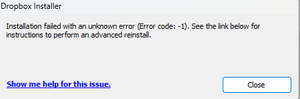
The app won't start, after trying to install it on a new OS update of Windows 11.
I keep getting error message Dropbox won't start after an install attempt. Does not install and I get this message. Was working well on WIn 11 64 before I sent my machine in for repair. Hard driv...
- 8 months ago
Hi there, mful38, let's look right into this!
Do you notice the same behavior when you try to download and install our app using our offline installer?
If so, then I'd also suggest an advanced reinstall using these steps.
Keep me posted on the results!

Megan Dropbox Community Moderator
8 months agoDropbox Community ModeratorHi there, mful38, let's look right into this!
Do you notice the same behavior when you try to download and install our app using our offline installer?
If so, then I'd also suggest an advanced reinstall using these steps.
Keep me posted on the results!
 mful387 months agoExplorer | Level 3
Yes. Tried the offline installer and had the same result.
- Megan7 months ago
Hey mful38, did you also try an advanced reinstall using the steps I provided above?
If you did but the issue remains the same, can I send you an email in order for us to have a closer look into this?
- mful387 months agoExplorer | Level 3
Hi Megan,
I followed all the steps and this time dropbox did install. Thank you.
Mike
About Apps and Installations
Have a question about a Dropbox app or installation? Reach out to the Dropbox Community and get solutions, help, and advice from members.
The Dropbox Community team is active from Monday to Friday. We try to respond to you as soon as we can, usually within 2 hours.
If you need more help you can view your support options (expected response time for an email or ticket is 24 hours), or contact us on X, Facebook or Instagram.
For more info on available support options for your Dropbox plan, see this article.
If you found the answer to your question in this Community thread, please 'like' the post to say thanks and to let us know it was useful!


