Our Community is in read-only mode until April 8th, learn more here. You can still search existing threads or get help via Dropbox Support, the Dropbox Help Center, or Learn.
Forum Discussion

Mark Shreds
9 months agoNew member | Level 2
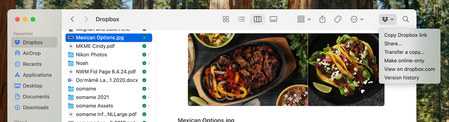
The Dropbox folder on my business user profile is missing the Dropbox icon (top right corner)
I just moved to a new MACbook Air. Latest OS system. I keep 2 profile on the computer; one for business and one for personal. I use the same Dropbox account for both purposes. I added the account...

Hannah Dropbox Community Moderator
9 months agoDropbox Community ModeratorThanks for reaching out to the Dropbox Community, Mark Shreds.
I'm sorry to see that you're having an issue with this, but let's see what we can find.
Regarding your support options, you can find them on this page, however, you'll need to choose your issue type first to see them all.
As for your issue, on the Dropbox folder that doesn't have the Dropbox icon at the top right, do you see any Dropbox options when you right-click on files?
Also, do you have the Dropbox icon in your menu bar? If so, what do you see when you hover over it?
Let me know and we'll go from there.

Mark Shreds
9 months agoNew member | Level 2
Hannah - thanks for the quick reply. Yes When I open the Dropbox App I can see the Dropbox Icon in the Menu Bar and it functions properly in both accounts.
When I right click on a file it does give me all the options the icon in the top right finder box gives me so that is an option but would prefer to have the icon. Do you have any ideas?
About Apps and Installations
Have a question about a Dropbox app or installation? Reach out to the Dropbox Community and get solutions, help, and advice from members.
The Dropbox Community team is active from Monday to Friday. We try to respond to you as soon as we can, usually within 2 hours.
If you need more help you can view your support options (expected response time for an email or ticket is 24 hours), or contact us on X, Facebook or Instagram.
For more info on available support options for your Dropbox plan, see this article.
If you found the answer to your question in this Community thread, please 'like' the post to say thanks and to let us know it was useful!


