We’re Still Here to Help (Even Over the Holidays!) - find out more here.
Forum Discussion

Warura
8 months agoExplorer | Level 3
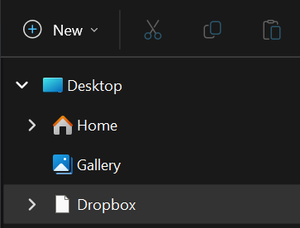
The icon of the Dropbox folder appears to be a blank page in File Explorer.
A little nuisance, but I guide myself with the icon when I am working and switching between windows. Everything else works fine. About a week ago, I don't know if there was an update, but the Dropbox...

Warura
8 months agoExplorer | Level 3
Everything is working fine, syncs, web account, mobile devices, etc. Just that icon from the file explorer apparently changed to what seems like a blank page. The Dropbox icon is ok in the normal drive location, though. It is only glitching in the quick access part of the File Explorer, where the Dropbox also appears after installation. This has been like this for a week, I have been restarting and powering down the computer frequently, so that is not fixing the issue.

Nancy Dropbox Community Moderator
8 months agoDropbox Community ModeratorI see, thanks for clarifying that, Warura! May I ask for one more full screenshot of the entire File Explorer’s sidebar (top to bottom), just to have a clearer image of what may be happening? If there’s something irrelevant to Dropbox that you don’t want visible here, feel free to mask it first.
Please also let me know of your Dropbox app version, once you’ve checked it.
- Warura8 months agoExplorer | Level 3
Version: 223.4.4909
About Apps and Installations
Have a question about a Dropbox app or installation? Reach out to the Dropbox Community and get solutions, help, and advice from members.
The Dropbox Community team is active from Monday to Friday. We try to respond to you as soon as we can, usually within 2 hours.
If you need more help you can view your support options (expected response time for an email or ticket is 24 hours), or contact us on X, Facebook or Instagram.
For more info on available support options for your Dropbox plan, see this article.
If you found the answer to your question in this Community thread, please 'like' the post to say thanks and to let us know it was useful!


