We’re Still Here to Help (Even Over the Holidays!) - find out more here.
Forum Discussion

Kester
10 years agoCollaborator | Level 8
Windows 7 Event Viewer Error "Failed to connect to the driver: (-2147024894)"
Onthe last few startups of my Windows 7 desktop, the EventViewer has shown the following error and subsequent information logs as the error is corrected by Windows: Record Number: X 95916 Log T...
 9 years ago
Hi everyone!
Sorry for the delay here -- I usually hang out on the client builds forum and missed this.
This error is expected and harmless. We are optimistically checking for features currently in development and logging an error when we don't find them enabled. We shouldn't be logging it as an error, however, perhaps as an Informational-level event and I'll make sure we clean this up in a future release.
If you're suspicious that this has been causing instability -- this hasn't really changed since last summer so it's probably not the droids you are looking for (combined with the fact that the error is indicative of things not happening, rather than things happening that are potentially destabilizing).
-Ben
 9 years agoHi all,First: Many apologies for the delay in jumping in here, I wanted to make sure I had a concrete update for you all.So, for context: What is Dbxsvc? :I've added a section to the help center article: https://help.dropbox.com/desktop-web/smart-sync (I say section, it's more of a note at the bottom under the driver FAQ).The file dbxsvc.exe is a file that we use to install the Smart Sync driver. Should you not be a business user, or not have Smart Sync, then this file will never start operating. It is, however, created at install for all users so if you are not a Smart Sync this file will still appear there.I see we have a number of pretty interesting, creative suggestions on how to disable, coupled with queries if it's safe to disable it. I'm of course not going to endorse a process that disables part of our software, should a feature or functionality cause user pain then we would want to know. Fixability and timeframes can vary depending on the in-depth technical nature of the problem.Should you decide to disable it with one of the solutions here, it will prevent the smart sync feature from working in some cases. We need the service to update the driver, as well as to establish new driver<->client connections. This is the services current functionality. Additional functionality could be added over time. My main concern around anyone disabling it is that in the future you may need this process, Smart Sync won't work correctly, you can reach out to support but this custom change you've made will be hard for us to diagnose as the root cause of whatever issue you experience.Why is it failing to connect / what's going wrong?:It should be failing to connect. This is by design, the actual issue you’re facing is due to the frequency we're writing to the logs. To address any concerns around error with the application, these errors are in no way indicative of a software issue and do not point to any issues with backing up you data. Because it fails to connect, Windows treats this as a trigger to write to the log. Your data is safe, this process is just used to install a driver. As covered in the above section we expect it to do what you are seeing.With that in mind, we understand that some of you do wish to see this behaviour.Why aren't we fixing this?:We are, we take our user feedback very seriously and we have spent many hours working on this. As fixes have many dependencies, and are just one components of a version release, I'm always reluctant to jump onto a thread and give a firm release date for a fix as these are regularly subject to change.You may have noticed that we took the original connection attempt frequency down from every 1 second to every minute. This was an improvement we took onboard based on the feedback you've supplied here and also via other channels. Our new release, 31.3.15, has further improved this, the process will run 3 times daily. This should reduce the errors written to the logs and not clutter the report.The new beta version is the first to include a fix:

svenluijten
9 years agoNew member | Level 2
Hi all,
Just dropping in here to say thank you for your amazing research and persistence trying to get this issue fixed. I've been experiencing the same problems for a while now, but could never trace it back to Dropbox until today. Unlike a lot of you, my PC just completely freezes and becomes unusable, instead of simply throwing an error in the Event Log.
While this does seem like a pretty critical issue, I'm baffled by the fact that Dropbox apparently don't want to fix this issue, if I understand the previous replies in this thread correctly. I will also email support with my findings, hoping they'll reconsider, but I highly doubt it.
Anywho, thank you all again for the amazing research so far! I'll keep you posted about my correspondence with Dropbox Support.

MeATDolphin
9 years agoHelpful | Level 6
Same problem for me and when I have seen the number of reads for this thread, I thought that's unbelievable they do not fix it from Dropbox side!
Just an idea, but did somebody check if the missing file(s) (dbx.sys and others?) could be found in a previous Dropbox installation? If so why not extracting them and make them available to download via Dropbox ;-). Users then could manually put them into the folder where Windows checks for them ...
 vkapartzianis9 years agoHelpful | Level 6There's no easy fix, otherwise they would've applied it. They ship three versions of the "missing" dbx.sys ("canary", "dev" and "stable") but they're identical and just fail to load.
In general, it's much safer to just disable the service, and leave the driver failing to load, than trying to make them work, in my opinion.- MeATDolphin9 years agoHelpful | Level 6
That's what I did now but reading the problem comes back with updates I wanted to get this clarified. So it is also confirmed there is no old version that worked in a previous install?
I found the entry in the event viewer today as I just checked System and not Application events before and when I found this thread then, I couldn't believe the whole Dropbox community may have the issue.
I thought my wife triggers the freezes somehow via the browser as it mostly happened when she used the computer but now I am quite sure that was just my good and her bad luck!
- MeATDolphin9 years agoHelpful | Level 6If the service is not needed at all, can't it just be removed by them via an update, so the problem does not come back with updates again?
- vkapartzianis9 years agoHelpful | Level 6
To recap:
* The installation package adds an entry for a file system driver (dbx.sys) and a service (DbxSvc.exe).
* There's no dbx.sys installed though. We get three identical files, dbx-canary.sys, dbx-dev.sys and dbx-stable.sys in %SystemRoot%\System32\drivers.
* The file system driver fails to load obviously. The service tries to communicate with the driver and fails, too. Note that the service uses named pipes to communicate with the driver as far as I can tell, that's why we get a misleading ("The system cannot find the file specified") explanation for the error ("Failed to connect to the driver").The service and the driver are probably part of the, in development, "Project Infinite" as Loopback mentioned in an earlier post. The development team is aware of all the problems this causes. They probably believe the problems are benign and won't spend the time required to fix them in any case.
- MeATDolphin9 years agoHelpful | Level 6
- 13223 views of this thread
- More and more users reporting "Me too!"
- External threads like these:
- https://www.tenforums.com/performance-maintenance/70442-dbxsvc-error-event-viewer.html
- https://community.spiceworks.com/windows_event/show/23846-dbxsvc-320
- http://windowssecrets.com/forums/showthread.php/178422-Event-Viewer-ID-320
- http://www.freefixer.com/library/file/DbxSvc.exe-242995/
Reports about computers that freeze and need to be restarted and it does not look benign to Dropbox? That's not serious, that's a shame!
- MeATDolphin9 years agoHelpful | Level 6Maybe this helps if we all vote for it? https://www.dropboxforum.com/t5/Dropbox/Fix-Dropbox-drivers-that-freeze-user-PCs/idi-p/203317
 Kester9 years agoCollaborator | Level 8
I've just received the following via email from Dropbox Customer Support:
Thank you for contacting Dropbox Support!
I have reviewed the error message with our team and would like to provide further information to help. The error message that you received regarding the failed connection to the drivers is related to your device's ability to read the software driver installed for Dropbox to operate. The information provided on our forums are predominately answered by our internal team directly to our users which appears as a "Dropboxer Reply" or users in the community that are "super users" and have a extensive knowledge of our product.
I hope this answers your question! If I can assist you with something else, please let me know!
The underlining has been added by me - clearly, all along, the problems was the fault of my device and yes, it was also the fault of the devices belonging to all you other users who have also reported the problem. Why cannot Dropbox be honest?
- MeATDolphin9 years agoHelpful | Level 6
So they tell us our devices (computers) are not capable to run their drivers but don't explain why that shall be the case?!? Maybe they are right but then they need to give us clear information about the prerequisites to run these drivers. Could be something like e.g. Intel but not AMD processors being supported but how shall we know if they don't tell us?
- orion449 years agoHelpful | Level 6The don't tell us because their development team is off-shore and not accessible to the application support team. So in other words, they don't know themselves. I admire your persistence in this matter, however I gave up weeks ago myself. Google Drive is working very well for my needs.
- bn9 years ago
Dropbox Staff
Hi everyone!
Sorry for the delay here -- I usually hang out on the client builds forum and missed this.
This error is expected and harmless. We are optimistically checking for features currently in development and logging an error when we don't find them enabled. We shouldn't be logging it as an error, however, perhaps as an Informational-level event and I'll make sure we clean this up in a future release.
If you're suspicious that this has been causing instability -- this hasn't really changed since last summer so it's probably not the droids you are looking for (combined with the fact that the error is indicative of things not happening, rather than things happening that are potentially destabilizing).
-Ben
- MeATDolphin9 years agoHelpful | Level 6
Let's see if the freeze is gone now after I have deactivated the agent and if so, it is not that harmless because I have not done any other setup change. Doubt and see ;-)
- mat-glock9 years agoHelpful | Level 5
Installed in Nov... started the computer shutdowns.. uninstalled, no more shutdowns.
I have office with 5 TB of space for less than $100 and get 5 installs of microsoft office with it...
My entire experience with DB was really disappointing, having picked up the service for cheap in Nov... I was really happy.
Maybe loginmein will buy them and restore confidence in the company again. Not sure how DB makes it with support like this.
- MeATDolphin9 years agoHelpful | Level 6
My PC freezed today with the Windows login screen before any app was loaded so the problem for me is not DB.
- Kester9 years agoCollaborator | Level 8
Hi BN,
If I understand you correctly, you are to modify code in a future program update so that the Event Viewer will not report the issue as an error but just list it as information during startup. You will not be removing the issue as you will be continuing your 'optimistic checking' of current development features. Surely this is the reason developers release beta versions of software so that users are aware nothing is finalised and are happy to co-operate and report back experiences. Why is Dropbox treating a so-called stable release of a program as a test bed rather than making an additional beta version available for users who would like to help test new developments?
- Kester9 years agoCollaborator | Level 8
Hi MeATDropbox,
It certainly seems you have additional problems. If you haven't done so already it might be worth running 'sfc /scannow' and perhaps 'ChkDsk' to see if that helps. It is also possible that somehow your user account has become corrupted so you may need to see if setting up another user account and logging on to that is successful. If the latter succeeds you should be able to copy/move all your data files into the new account and then remove the problem account.
 Loopback9 years agoHelpful | Level 6
Hi,
the problem seems to be fixed!
After the last DB update to V.20.4.19 the DbxSvc service starts without any error, at least at my Win7-x64 system.
- Loopback9 years agoHelpful | Level 6
... the error "Failed to connect to the driver: (-2147024894) ..." is still there, but now it's classified as "information" only.
- NickG_UK9 years agoHelpful | Level 5
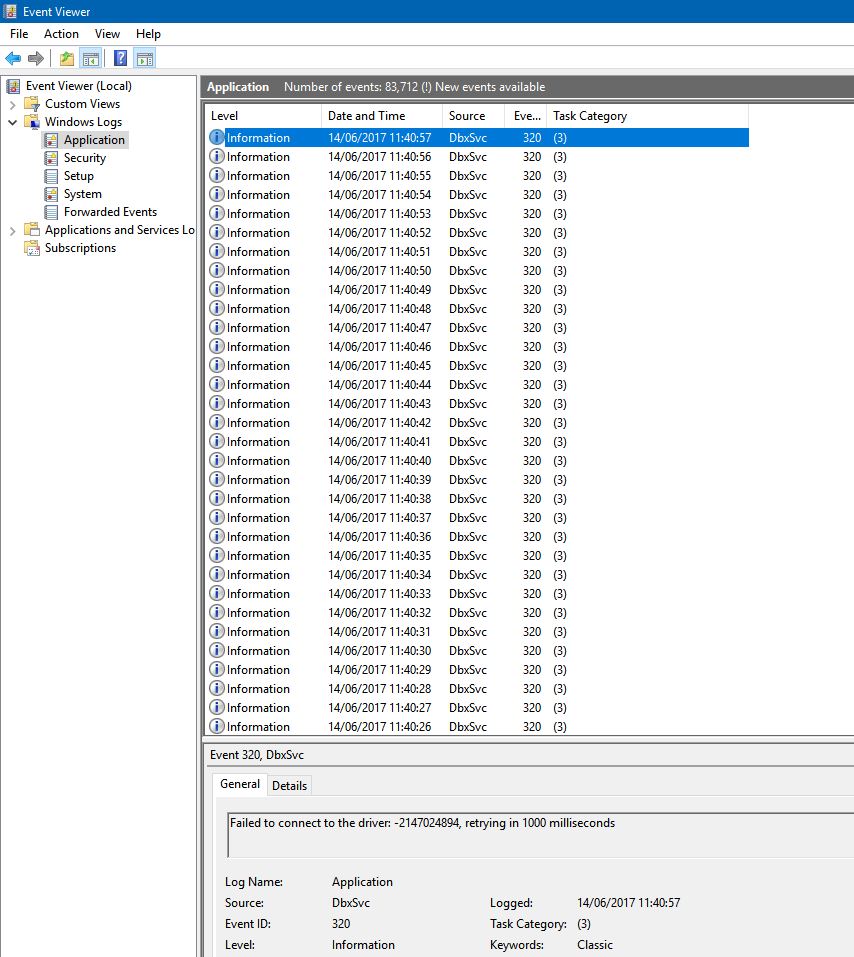
Do you know when this will be fixed? It currently logs this error once per second on the event log, which makes it very difficult to find any other useful information. If DropBox needs to log something as often as every second, it should perhaps only do it when a debug flag is set or perhaps to it's own log file somewhere.
Nick
- Loopback9 years agoHelpful | Level 6
Are you sure that service DbxSvc is the culprit for producing an event "-2147024894" once per second?
On my Win7(x64) sytem I see this event at level "Information" (EventID 320) within the Application branch of the event log only once every time the DbxSvc service starts (that is after a system boot), and it always comes along with two other informational DbxSvc log entries: EventID 336 (Service started (1.0.22.0).) and EventID 258 (Pipe server thread started.)
- NickG_UK9 years agoHelpful | Level 5
Yes - it's done it once a second all day so far. Making the whole event log totally useless for me.
- Loopback9 years agoHelpful | Level 6
My DB version was 27.4.22, hence I just updated to the latest version 28.4.14 in order to check if I can see the same behaviour that you observe - fortunately EventID 320 still only happens once per DbxSvc start.
The difference is that on my system event 320 says "Failed to connect to the driver: (-2147024894). The system cannot find the file specified." while the same event on your system shows a deviating explanatory text: "Failed to connect to the driver: (-2147024894), retrying in 1000 milliseconds". (Look at the "Recovery" tab of the DbxSvc service (right click on "Properties") in service manager: Any non default settings?)
If you use an older DB version and an update to the latest doesn't help, my workaround (described here) might possibly be helpful to you.
 Nocturnal9 years agoHelpful | Level 5
Problem return yesterday.
Dropbox 29.3.19. Windows 10 x64. The problem is absolutely the same as all people higher have.
 Crazy_Demon9 years agoExplorer | Level 3
Problem return yesterday.
Dropbox 29.3.19. Windows 10 x64.
- orion449 years agoHelpful | Level 6
- ebonato9 years agoNew member | Level 2
I`ve just found a way to stop logging "informational" "Failed to connect to the driver: -2147023658". But you will need to see my entire quest to get the big picture...
First, I'm a user of Windows Insider Enterprise, which already gave me others problems in the past (with another softwares, not DropBox until now)...
On Windows Insider build 16215, I was facing some issues with keyboard, when using portuguese letters with accents (é ã á ...)... even with correct keyboard layout configurations... definily that wasn't a simple keyboard configuration issue....things goes more interesting when finding that using gmail with Chromre, I couldn't to use accented letters, but using gmail Edge I was able to use...
On another PC at working, I could move foward to Windows Insider build 16226, and this keyboard issue was gone...
Trying to move foward to 16226 on home laptop, I droped on this issue with Dropbox... for some reason, this issue with dropbox (error connecting to driver) seems to be impacting update process of build 16226, holding me up with bogus build 16215. The dropbox service itself was working normally, without issues.Checking event viewer, I've found more then 200.000 entries about this "informational" error connecting to driver from dbxsvc. So I've to check this error on dropbox community.
Reinstalled dropbox, restarting service, tried everything that you already tried on this thread.
Reading previous replies on this thread, I was able to understand about different versions of dbx.sys (the driver wich dbxsvc service cannot connect). Using Process Hacker, I changed the FS driver entry to the dbx-dev.sys.
Restarted FS Driver and dbxsvc and BANG... new true "informational" messages:
The file is signed and the signature was verified: C:\Program Files (x86)\Dropbox\Client\Dropbox.exe
Certificate match for file: C:\Program Files (x86)\Dropbox\Client\Dropbox.exe
Accepting connection from client: C:\Program Files (x86)\Dropbox\Client\Dropbox.exe
The file is signed and the signature was verified: C:\Program Files (x86)\Dropbox\Client\Dropbox.exe
Certificate match for file: C:\Program Files (x86)\Dropbox\Client\Dropbox.exe
Accepting connection from client: C:\Program Files (x86)\Dropbox\Client\Dropbox.exe
Attempting to load driver, version: dev
Loaded the driver.
Connected to the driver
After that, Windows update goes foward to build 16226 without issues.
I cannot double check if this issue with windows update is really related with dropbox FS driver, but I've found interesting to share.
Cheers,

About Apps and Installations
Have a question about a Dropbox app or installation? Reach out to the Dropbox Community and get solutions, help, and advice from members.
The Dropbox Community team is active from Monday to Friday. We try to respond to you as soon as we can, usually within 2 hours.
If you need more help you can view your support options (expected response time for an email or ticket is 24 hours), or contact us on X, Facebook or Instagram.
For more info on available support options for your Dropbox plan, see this article.
If you found the answer to your question in this Community thread, please 'like' the post to say thanks and to let us know it was useful!


