We’re Still Here to Help (Even Over the Holidays!) - find out more here.
Forum Discussion

AC-PGA
3 years agoNew member | Level 2
Connecting Dropbox to Workfront Fusion
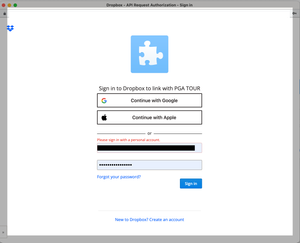
I am trying to connect to a Business account via Workfront Fusion. I can make the connection on the Fusion side after adding App and Secret Key but when it opens the Dropbox login box and I add my cr...

Jay Dropbox Community Moderator
3 years agoDropbox Community ModeratorHi AC-PGA, thanks for bringing this to our attention.
As you're on a Dropbox Business team, this is why you're getting this message.
You'd need to add a personal account which isn't associated with a team from the looks of it.
If you have any further queries, feel free to message back.

AC-PGA
3 years agoNew member | Level 2
I added a personal email account and was able to login for a minute, the App sent me the 6 digit security code for me to use in the login window but once I added the code, it took me back to login window and it is telling me to "Please sign in with a personal account". I added an email account to the Business account which I am not using in any of the folders, just trying to use it to access the App.
- Jay3 years ago
Thanks for the info. As this is related to how the Workfront app or service logs in, I'd recommend contacting them directly for further support.
About Integrations
Find solutions to issues with third-party integrations from the Dropbox Community. Share advice and help members with their integration questions.
The Dropbox Community team is active from Monday to Friday. We try to respond to you as soon as we can, usually within 2 hours.
If you need more help you can view your support options (expected response time for an email or ticket is 24 hours), or contact us on X, Facebook or Instagram.
For more info on available support options for your Dropbox plan, see this article.
If you found the answer to your question in this Community thread, please 'like' the post to say thanks and to let us know it was useful!


