Our Community is in read-only mode until April 8th, learn more here. You can still search existing threads or get help via Dropbox Support, the Dropbox Help Center, or Learn.
Forum Discussion

FritzMiller
3 years agoExplorer | Level 4
Dropbox conflict with Photoshop, can't disable Backup
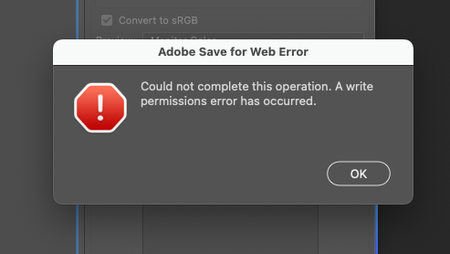
Apparently there is an issue with Dropbox Backup preventing Photoshop's Save-for-Web feature from saving.
One netizen suggested to disable Dropbox backup under preferences/backups/manage backups/Di...

Megan Dropbox Community Moderator
3 years agoDropbox Community ModeratorHi FritzMiller, let's jump right into this!
In regards to your Photoshop issue, I'm afraid I wouldn't have the expertise to give you an answer as to why this might be happening.
We can, however focus on your Computer Backup and see what we can do about that. I can see that you also tried disabling the feature using the web.
Can you click on the "view errors" message, and let me know what it reads?
Thanks a bunch!
FritzMiller
3 years agoExplorer | Level 4
The 3rd screenshot is what you see when I click on "view errors".
Here is the conversation on Adobe's forums about the conflict.
- Jay3 years ago
Hi FritzMiller, have you quit any open applications or services (such as Adobe itself) on your machine, apart from the Dropbox app, before you disabled the computer backup feature?
This would be to prevent any app currently accessing those folders from stopping the process.

About Integrations
Get help with third-party integrations from the Dropbox Community.
The Dropbox Community team is active from Monday to Friday. We try to respond to you as soon as we can, usually within 2 hours.
If you need more help you can view your support options (expected response time for an email or ticket is 24 hours), or contact us on X, Facebook or Instagram.
For more info on available support options for your Dropbox plan, see this article.
If you found the answer to your question in this Community thread, please 'like' the post to say thanks and to let us know it was useful!


