We’re Still Here to Help (Even Over the Holidays!) - find out more here.
Forum Discussion

LRBH
4 years agoExplorer | Level 4
iOS Dropbox app won’t acknowledge Microsoft Word app
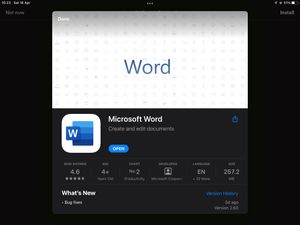
I’m on Dropbox version 274.2 and Microsoft Word version 2.60. Today I started having an issue where trying to open a Word doc in my Dropbox app prompts me to install Word, despite the app being insta...

Elixir
4 years agoStar | Level 19
Can you please try installing Microsoft unified Office App https://aka.ms/OfficeAppiOS? Note that now Microsoft has a unified office app (along with individual Word, Excel, PowerPoint, and OneNote apps), which can be used to view/edit all supported office files. Then reinstall the Dropbox app as well.

mduck314
4 years agoNew member | Level 2
Having the same issue after the last IOS update. I did all the above. Does not work. Keeps asking me to download Excel but it is already installed 😞
- Megan4 years ago
Dropbox Community Moderator
Hi allenng, happy to see that your troubleshooting managed to resolve this!
Also, mduck314, can I ask the version of the OS and Dropbox app that you have installed to your device? Feel free to also send me a screenshot of the error message you see on your end when trying to preview the files.
Thanks a bunch!
 Kerry124 years agoExplorer | Level 4Megan, I just did an update as well and I think that’s when it started happening. I have an iPhone and I did the iOS update 15.4.1
Why does Dropbox not have a phone number to contact anyone for support?- Kerry124 years agoExplorer | Level 4Also, I can open Microsoft and excel directly through their apps and get all of my documents there. But when I go through dropbox to open up excel or word, it asked me to install the app.
- mduck3144 years agoNew member | Level 2Hi! This all happened after the last IOS update.
OS version iPadOS 15.4.1
Dropbox app version 276.2
Before this past week, I would click the upload button and Dropbox on the spreadsheet and it would go to my Excel app and open it there for edits. Now the only way to get to it is to go to my Excel app go to Dropbox folders and go through manually each one till I find the one I need.
- Kerry124 years agoExplorer | Level 4Same. Mine was after an update .


About Integrations
Find solutions to issues with third-party integrations from the Dropbox Community. Share advice and help members with their integration questions.
The Dropbox Community team is active from Monday to Friday. We try to respond to you as soon as we can, usually within 2 hours.
If you need more help you can view your support options (expected response time for an email or ticket is 24 hours), or contact us on X, Facebook or Instagram.
For more info on available support options for your Dropbox plan, see this article.
If you found the answer to your question in this Community thread, please 'like' the post to say thanks and to let us know it was useful!


