Our Community is in read-only mode until April 8th, learn more here. You can still search existing threads or get help via Dropbox Support, the Dropbox Help Center, or Learn.
Forum Discussion

Scott H.
6 years agoCollaborator | Level 9
"Open in Finder" and "Open in Word" not showing in Safari OSX for Mac
Hey folks,
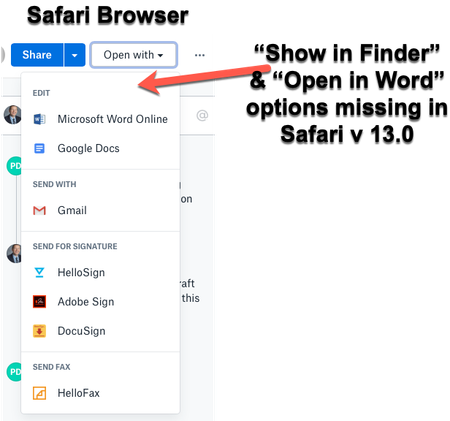
When viewing dropbox files from the Safari browser (Safari v 13.0) I can no longer see the "Show in Finder" or 'Open in Word" / "Open in Adobe Acrobat" options for files.
I also have ...

Scott H.
6 years agoCollaborator | Level 9
Hi all,
So I've updated to Mac OS Catalina running Safari Version 13.0.2 (15608.2.30.1.1) and Dropbox v82.4.155 the issue still persists.
This issue affects my productivity workflow so i got a Mac Specialist to have a look at it for me. He is able to reproduce the error on his own machine and is unable to find a solution. Thinks it may be a bug in either Safari or Dropbox.
Additionally, I've just bought my daughter a Macbook Air and I am able to reproduce this same error on her device running Mojave and Safari 13.0 and also after upgrading to Mac OS Catalina running Version 13.0.2 (15608.2.30.1.1) & Dropbox v82.4.155.
So still no further ahead but I thought I'd post back here just in case this information is useful to anyone.
Scott

tsigel
6 years agoHelpful | Level 5
Hello!
I have exactly same problem
MacOS Catalina 10.15, Safari 13.0.2, Dropbox 82.4.155
i have "open in Finder" button in Chrome but i need it in Safri
About Integrations
Get help with third-party integrations from the Dropbox Community.
The Dropbox Community team is active from Monday to Friday. We try to respond to you as soon as we can, usually within 2 hours.
If you need more help you can view your support options (expected response time for an email or ticket is 24 hours), or contact us on X, Facebook or Instagram.
For more info on available support options for your Dropbox plan, see this article.
If you found the answer to your question in this Community thread, please 'like' the post to say thanks and to let us know it was useful!


