We’re Still Here to Help (Even Over the Holidays!) - find out more here.
Forum Discussion

Scott H.
7 years agoCollaborator | Level 9
"Open in Finder" and "Open in Word" not showing in Safari OSX for Mac
Hey folks,
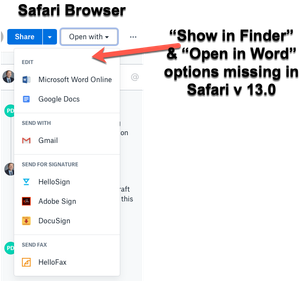
When viewing dropbox files from the Safari browser (Safari v 13.0) I can no longer see the "Show in Finder" or 'Open in Word" / "Open in Adobe Acrobat" options for files.
I also have ...

DRaymond
6 years agoExplorer | Level 4
I'm also experiencing this issue. The Open button shows up in Chrome but not in Safari. I've done the troubleshooting steps recommended in this thread and in "The Open button — why it may not appear" and nothing works. Would love to see a solution.

jondotcom
6 years agoHelpful | Level 6
I am having this issue as well, also with Microsoft Edge for MacOS. Chrome works as-expected, though Safari & Microsoft Edge (which is based on Chromium, as is Google Chrome) do not display the "Open in finder" option.
I filed a separate ticket for my Microsoft Edge-specific issue, but I wanted to share the context here that it's not specific to Safari. Unfortunately that ticket hasn't been resolved and I too have been waiting a while with no follow-up.
- Daphne6 years ago
Dropbox Community Moderator
Thanks for your updates here!
At the moment I don't have any other updates to share with you all on this other than what Fiona already mentioned, that our team is currently looking into this issue.
I will make sure to keep everyone updates with any news that we receive on this, but in the meantime please don't hesitate to get back to me here with any questions on this.
Thanks for your patience while we investigate!
 bbakech6 years agoHelpful | Level 5
I have the same issue here.
Running Dropbox on MacOS Catalina 10.15.4 using Safari 13.1.
On Chrome, I definitely can open in Finder.
No way to get it to work on Safari which is my preferred browser. Tried uninstalling and reinstalling Dropbox, tried insalling Flash and enabling it in Safari for Dropbox. Made sure the file was not in an excluded folder as part of Selecting Sync.
Please, fix this as this is so needed for our team daily workflow !
Thank you
 Newoldschool6 years agoHelpful | Level 5
This is so frustrating, we were all waiting for months, this is a super expensive service and you are not providing us with professional customer care or service.
How can I ask for a refund? I want to end my annual subscription for free and get a refund for what I've paid.
I cannot use dropbox with safari, I cannot use dropbox with asana, half of my workflow is compromised.
Dropbox used to be a better service, a premium service, are yoou going to end up being another google drive?
:triumph:
(sorry for my english, not an english speaker, and yes, US dollares are crazy expensive for my, I'm so angry)

About Integrations
Find solutions to issues with third-party integrations from the Dropbox Community. Share advice and help members with their integration questions.
The Dropbox Community team is active from Monday to Friday. We try to respond to you as soon as we can, usually within 2 hours.
If you need more help you can view your support options (expected response time for an email or ticket is 24 hours), or contact us on X, Facebook or Instagram.
For more info on available support options for your Dropbox plan, see this article.
If you found the answer to your question in this Community thread, please 'like' the post to say thanks and to let us know it was useful!


