We’re Still Here to Help (Even Over the Holidays!) - find out more here.
Forum Discussion

Scott H.
7 years agoCollaborator | Level 9
"Open in Finder" and "Open in Word" not showing in Safari OSX for Mac
Hey folks,
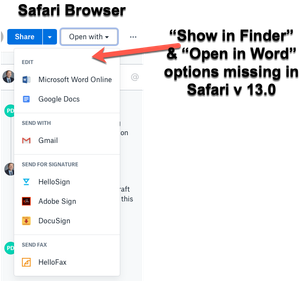
When viewing dropbox files from the Safari browser (Safari v 13.0) I can no longer see the "Show in Finder" or 'Open in Word" / "Open in Adobe Acrobat" options for files.
I also have ...

yuvrajgnlu
5 years agoNew member | Level 2
I am having the same issues with Safari 14. Chrome shows these two options, but safari doesnt. Dropbox clearly has not cared enough to fix this issue, even though it is being experienced by everyone. With the new Safari and Mac updates - a lot of people have left chrome and moved to Safari, but Dropbox has not cared even now to fix this!!
Also, FlashPlayer has reached its end of life - and adobe will be discontinuing flashplayer in Jan 2021. They had announced that three years ago: https://www.adobe.com/products/flashplayer/end-of-life.html So what happens now! With no flashplayer, how is dropbox planning to handle this? It is high time dropbox did something about this feature as it is very crucial for the quality of dropbox and our experience with it.

Lusil Dropbox Staff
5 years agoDropbox StaffHey everyone, thanks for all your questions on this.
We're not expecting any impact on the deprecation of Flash Player as Dropbox isn't using it.
I hope this helps puts your minds at ease, but if anything else comes up, just give us a shout. Cheers!
 WildfireQueen5 years agoHelpful | Level 7
What about the 'open in finder' issue? Is there any news on that? Like others I had to switch to Chrome as a main browser to efficiently use dropbox, since my collegues and I send each other a lot of dropbox links.
 bbakech5 years agoHelpful | Level 5
Yes, what about "Open in Finder" with Safari which is still missing?
I will not use Chrome, as it drains too much battery and has increasingly more performance issues.
About Integrations
Find solutions to issues with third-party integrations from the Dropbox Community. Share advice and help members with their integration questions.
The Dropbox Community team is active from Monday to Friday. We try to respond to you as soon as we can, usually within 2 hours.
If you need more help you can view your support options (expected response time for an email or ticket is 24 hours), or contact us on X, Facebook or Instagram.
For more info on available support options for your Dropbox plan, see this article.
If you found the answer to your question in this Community thread, please 'like' the post to say thanks and to let us know it was useful!


