We’re Still Here to Help (Even Over the Holidays!) - find out more here.
Forum Discussion

Scott H.
7 years agoCollaborator | Level 9
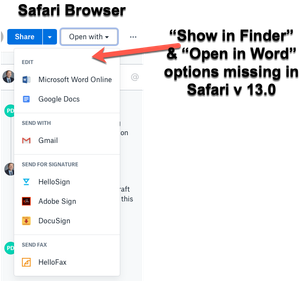
"Open in Finder" and "Open in Word" not showing in Safari OSX for Mac
Hey folks,
When viewing dropbox files from the Safari browser (Safari v 13.0) I can no longer see the "Show in Finder" or 'Open in Word" / "Open in Adobe Acrobat" options for files.
I also have ...

Lusil Dropbox Staff
5 years agoDropbox StaffAlthough I don't have a specific time frame I can offer, rest assured, the team is actively working on it.
I understand how important this is for you all and thank for you reaching out to us about this.
I understand how important this is for you all and thank for you reaching out to us about this.

WildfireQueen
5 years agoHelpful | Level 7
If it’s so important and you’re actively working on it (for over a year), can you at least share with us what the root of the problem is? Some kind of setting or use of code within Safari? Is Apple somehow preventing you from showing the ‘open in finder’ button or does it prevent you from the functionality of the button and you had to disable it because of that?
Can you provide any more information than the standard ‘we’re working on it’ we’ve been hearing for over a year?
Can you provide any more information than the standard ‘we’re working on it’ we’ve been hearing for over a year?
- drshero5 years agoHelpful | Level 5
I'm having the same problem.
I just switched (back) to Safari as my default browser, because it is more secure than Chrome and uses less system resources. The "Open in Finder" and "Open in Word" feature is critical to my work. We send dropbox links through Slack daily, and when clicked, they open in the default browser. Without the "Open in Finder" feature, I have to do multiple steps and clicks to search for the file manually. I would love to see this feature restored in Safari.
Thanks to those who have been raising this issue since 2019--I'm just adding my voice to ask for a fix so that DB is fully-functional in Safari.
 dgreeney5 years agoHelpful | Level 6
Outrageous that this is still an issue, close to 2 years in. "Open in Finder" is mission critical for many of us. Worked for years in Safari. Works fine in Chrome. What is the holdup here with getting this resolved?

About Integrations
Find solutions to issues with third-party integrations from the Dropbox Community. Share advice and help members with their integration questions.
The Dropbox Community team is active from Monday to Friday. We try to respond to you as soon as we can, usually within 2 hours.
If you need more help you can view your support options (expected response time for an email or ticket is 24 hours), or contact us on X, Facebook or Instagram.
For more info on available support options for your Dropbox plan, see this article.
If you found the answer to your question in this Community thread, please 'like' the post to say thanks and to let us know it was useful!


