Our Community is in read-only mode until April 8th, learn more here. You can still search existing threads or get help via Dropbox Support, the Dropbox Help Center, or Learn.
Forum Discussion

Scott H.
6 years agoCollaborator | Level 9
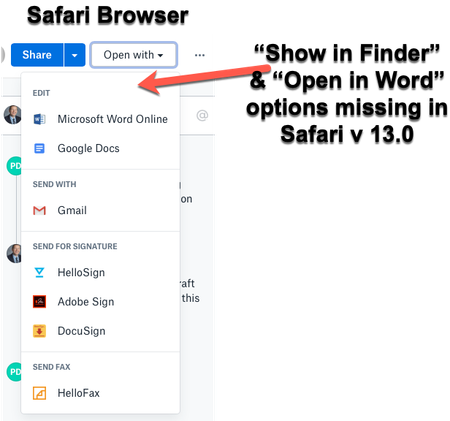
"Open in Finder" and "Open in Word" not showing in Safari OSX for Mac
Hey folks,
When viewing dropbox files from the Safari browser (Safari v 13.0) I can no longer see the "Show in Finder" or 'Open in Word" / "Open in Adobe Acrobat" options for files.
I also have ...

WildfireQueen
4 years agoHelpful | Level 7
Dropbox, can you explain why you've downgraded this functionality so?
Is there a reason for it, because it doesn't seem hiding such an initially efficient option behind several clicks and pages is very user friendly.
Would be great if you could give an actual explanation after people waited for several years for the fix of the option in Safari and you recently downgrading the functionality in Chrome with the new redesign. Or explain the thought process behind it. Instead of "investigating" the "issue" with individual users and not following up on those "investigations". Especially since it's not a bug or issue with the user, but a conscious designchoice Dropbox made.
Frankly, I think all of us here would really love an update on where you stand in this. I've taken time and effort to explain and document the issue, and haven't heard anything back after you've requested that information from me.

JuliaScruggs
4 years agoNew member | Level 2
This is extremely disappointing and now they have taken away the Dropbox App for Mac... I am disappointed in the lack of accountability dropbox has taken in this matter, with no effort to resolve it... I am working to move our whole law firm to start using an alternative system for file storage/sharing as we are all 100% working remotely and have to have a system that is user friendly and actually works.
About Integrations
Get help with third-party integrations from the Dropbox Community.
The Dropbox Community team is active from Monday to Friday. We try to respond to you as soon as we can, usually within 2 hours.
If you need more help you can view your support options (expected response time for an email or ticket is 24 hours), or contact us on X, Facebook or Instagram.
For more info on available support options for your Dropbox plan, see this article.
If you found the answer to your question in this Community thread, please 'like' the post to say thanks and to let us know it was useful!


