Our Community is in read-only mode until April 8th, learn more here. You can still search existing threads or get help via Dropbox Support, the Dropbox Help Center, or Learn.
Forum Discussion

Scott H.
6 years agoCollaborator | Level 9
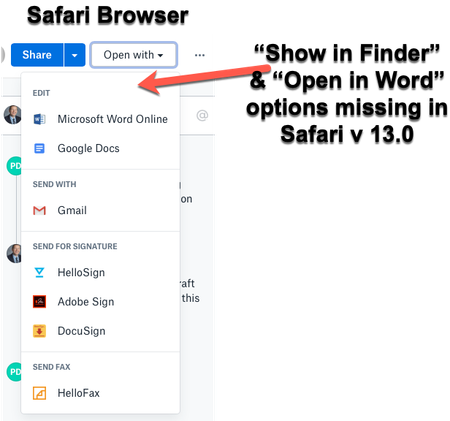
"Open in Finder" and "Open in Word" not showing in Safari OSX for Mac
Hey folks,
When viewing dropbox files from the Safari browser (Safari v 13.0) I can no longer see the "Show in Finder" or 'Open in Word" / "Open in Adobe Acrobat" options for files.
I also have ...

aleksandorov
4 years agoNew member | Level 2
I just had a long chat with Dropbox dude. This issue has not been solved. They removed this very useful option and hid it behind 5 clicks (if you know what you're doing). This is a big waste of time and patience for someone working with dropbox files all day long.

dgreeney
4 years agoHelpful | Level 6
It sure is a waste of time! I don't even bother with the "Open in Finder" option anymore. It's buried so deep that it's far easier to just use the Mac Dropbox app, search for the file (even using part of a word) and then quickly "Open in Finder" from there.
We'll see how long it is until Dropbox gets rid of this very useful feature, too!
About Integrations
Get help with third-party integrations from the Dropbox Community.
The Dropbox Community team is active from Monday to Friday. We try to respond to you as soon as we can, usually within 2 hours.
If you need more help you can view your support options (expected response time for an email or ticket is 24 hours), or contact us on X, Facebook or Instagram.
For more info on available support options for your Dropbox plan, see this article.
If you found the answer to your question in this Community thread, please 'like' the post to say thanks and to let us know it was useful!


