We’re Still Here to Help (Even Over the Holidays!) - find out more here.
Forum Discussion

Scott H.
7 years agoCollaborator | Level 9
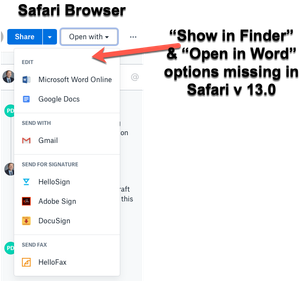
"Open in Finder" and "Open in Word" not showing in Safari OSX for Mac
Hey folks,
When viewing dropbox files from the Safari browser (Safari v 13.0) I can no longer see the "Show in Finder" or 'Open in Word" / "Open in Adobe Acrobat" options for files.
I also have ...

eyeforty
4 years agoNew member | Level 2
Also interested in this. Using Safari v15.5. The show in finder option is appearing in chrome but not Safari.

Hannah Dropbox Community Moderator
4 years agoDropbox Community ModeratorHey eyeforty, thanks for the nudge here.
Do you perhaps see a 'Dropbox' option with a Dropbox icon next to it in these options in Safari?
If so, can you please click on that, to see if that works?
- eyeforty4 years agoNew member | Level 2
Thanks for the quick reply Hannah. Here's a screenshot of what I'm seeing. Am I missing something?
- Hannah4 years ago
Thanks for the screenshot, eyeforty!
Hmm, can you confirm that the Dropbox application is running on your computer, and that the website is signed into the same Dropbox account?
If so, can you please clear Safari's cache, to see if that makes a difference?
 steveohm333 years agoHelpful | Level 6
I'm also having this problem - no "Open in finder" option in safari, only chrome. Latest safari, Ventura 13.3.1, enterprise dropbox account. Synced directories in our dropbox folder. Private window, no change.
About Integrations
Find solutions to issues with third-party integrations from the Dropbox Community. Share advice and help members with their integration questions.
The Dropbox Community team is active from Monday to Friday. We try to respond to you as soon as we can, usually within 2 hours.
If you need more help you can view your support options (expected response time for an email or ticket is 24 hours), or contact us on X, Facebook or Instagram.
For more info on available support options for your Dropbox plan, see this article.
If you found the answer to your question in this Community thread, please 'like' the post to say thanks and to let us know it was useful!


