We're making some changes to the Dropbox Community 👩💻 - Find out more here.
Forum Discussion

TiffEVD
7 months agoNew member | Level 2
How to remove the Dropbox subscription pop-up I keep seeing on the website?
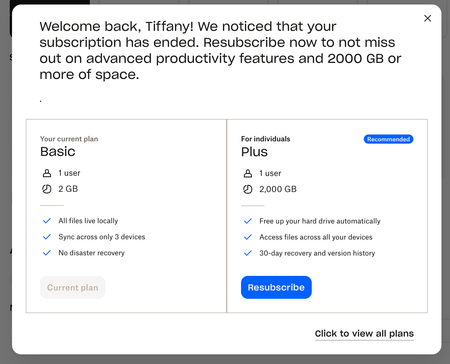
Does anyone know how to remove this subscription plan pop up from your dropbox account?
It appears on every page change which is tedious. I used to be subscribed but cancelled the plan and now this...


Nancy Dropbox Community Moderator
7 months agoDropbox Community ModeratorThanks for posting this on our forum, TiffEVD!
I'm guessing that you've already clicked on the X button located in the top right corner of the pop-up window and you still see it after that. Is this correct?
Can you try selecting the “Click to view all plans” option instead (in the bottom right corner of the prompt you’re seeing)? After being redirected to our Plans page, I'd like you to go back to your Dropbox homepage as a test.
Are you still seeing this window after that, or can you navigate your Dropbox account like you used to?
Let me know how it goes.

TiffEVD
7 months agoNew member | Level 2
Thanks for getting back Nancy
Yes I've done both methods and also on the "click to view all plans" I've tried exiting from that page as well as selecting the basic plan to try to confirm it but still keep getting the pop up.
- Nancy7 months ago
I see, thanks for giving it a go! What happens if you try a different browser instead, or even an incognito window on your current browser?
Does that make any difference?
- TiffEVD7 months agoNew member | Level 2
Yes I'm on Chrome, have tried incognito and Safari - it still pops up
About Plans and Subscriptions
Ask the Dropbox Community for help if you have questions about your Dropbox plan or subscription. Find solutions and share advice with members.
The Dropbox Community team is active from Monday to Friday. We try to respond to you as soon as we can, usually within 2 hours.
If you need more help you can view your support options (expected response time for an email or ticket is 24 hours), or contact us on X, Facebook or Instagram.
For more info on available support options for your Dropbox plan, see this article.
If you found the answer to your question in this Community thread, please 'like' the post to say thanks and to let us know it was useful!


