Your workflow is unique 👨💻 - tell us how you use Dropbox here.
Web
21 TopicsWe’re having some trouble with our payment page
We're currently experiencing a service disruption with Website. Status: Investigating Affected Systems: Website Started: 1/15/2026, 6:59:52 AM UTC Last Updated: 1/15/2026, 6:59:52 AM UTC For the most up-to-date information, please visit the status page: https://stspg.io/94ryjch8zht2 We are working towards a resolution as soon as possible, and we'll continue to share updates on this thread as soon as we learn more.Solved100Views0likes1Comment
Application to Dropbox Internship
Hello, Apologies if this isn't the correct place to ask this question, but I didn't know where else to put it. I am trying to apply to a position as a Software Engineer Intern for Summer 2026. On the application it asks when I will be graduating, with options only being between Fall 2026 - Spring 2027. The application is open to those pursuing a BS or MS. I will be graduating over the summer with my BS (which is not in the accepted time frame for the position), but I will be going straight into an MS (which would put me in the correct graduation timeframe). I wanted to ask HR if I can put my expected MS graduation time in order to apply to the position, but I don't know where I can contact them. If anyone knows the answer to my question that would also work. Thanks!101Views0likes1Comment
Add ability to opt out of upsell ads as a paying customer
Issue details: Just a bit of feedback: It's very frustrating seeing ads that that I have to click through *every single time* I want to use Dropbox's web interface, when I'm already a paying customer. There seems to be no way to opt out of these. Again, I'm a *paying* customer already. It makes me dread logging in. It's annoying enough that I will suggest to my team that we move to something else when we get the chance, and I will make a point to use something else for other projects.Solved166Views0likes10Comments
I cannot access email support with my paid Plus account
Dropbox Plan Plus Payment Method Card How did you upgrade? Sorry, don't remember Question or Issue Hi! I want to email a question to support. When I go to http://www.dropbox.com/get_help, it says my support options include email, but I only have access to the chatbot. The chatbot is unable to answer my question. How do I email a human? Thanks!215Views1like9Comments
I'm having trouble applying for a position - can I contact HR?
I’m trying to apply to a Dropbox job while living in a Zone 1 city with plans to relocate to a Zone 2 city in the spring of 2026 when my lease expires. Is there anyone I can contact to discuss this situation? The form won’t let me submit otherwise, with my current address.103Views0likes3Comments
How to stop the upgrade notifications on my Dropbox online?
I've had the Dropbox Plus plan for over 10 years and have been more or less happy with the service. My account is about ⅓ full at any given time. Most of the time I use the desktop app (Mac OS 15.6.1, dropbox v.237.4.5655) which syncs my files across 3 devices and between several apps. I don't sync all files to the desktop obviously, so sometimes I have to log in to the web version to see all files. Dropbox bombards me with requests to upgrade to business level and work with "my team". not just once or twice, but EVERY TIME I log in. That and the giant green button at the top a different color from everything else on the page constantly begging me to upgrade... aaaarrrrrghhhhh. Is the desktop site intended to drive away non-corporate customers? I've done lots of projects with other people and the whole point of using Dropbox was the ease of passing files between all our different freelance accounts. It's out-of-proportion annoying. I have scoured all the notification and account settings and found nothing. Please how can I stop it? thanks!155Views0likes1Comment
How to remove the Dropbox subscription pop-up I keep seeing on the website?
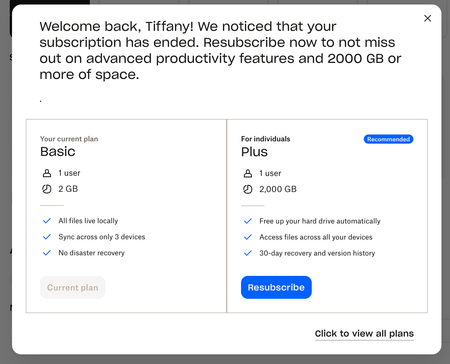
Does anyone know how to remove this subscription plan pop up from your dropbox account? It appears on every page change which is tedious. I used to be subscribed but cancelled the plan and now this pop up just won't quit! Any advice helpful, I've tried looking around and contacting via support email but was dismissed straight away. 'Welcome back, ............! We noticed that your subscription has ended. Resubscribe now to not miss out on advanced productivity features and 2000 GB or more of space.'Solved705Views0likes12Comments
I'm unable to use my free Dropbox account, because of "30 day free trial has ended" pop-up.
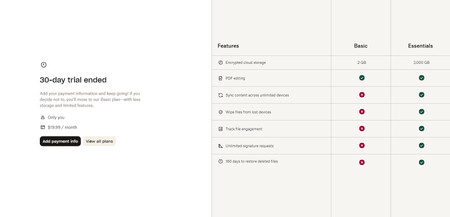
Please help me get rid of this annoying pop-up that has no exit button. I have a free basic plan of 2GB and I have only used 38.8MB of storage. Now, I cannot navigate my account because this pop-up saying my "30 day free trial has ended" keeps blocking the whole screen. Pl I only want the basic free plan but it does not allow me to continue with my basic free account. Please help. I've tried clearing my browsing data, using 3 different browsers, and using an incognito window.1.5KViews0likes10Comments