We're making some changes to the Dropbox Community 👩💻 - Find out more here.
Forum Discussion

TiffEVD
7 months agoNew member | Level 2
How to remove the Dropbox subscription pop-up I keep seeing on the website?
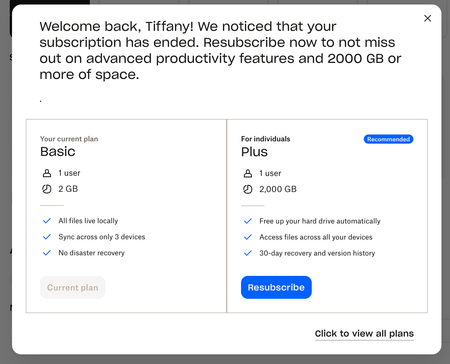
Does anyone know how to remove this subscription plan pop up from your dropbox account?
It appears on every page change which is tedious. I used to be subscribed but cancelled the plan and now this...


Roga41 Dropbox Staff
7 months agoDropbox StaffHi TiffEVD,
I understand how this can be an inconvenience on your end . To avoid or stop this upgrade notification to keep on popping up, you can always bring down whatever your used storage space to below 2GB by deleting files on your account. The upgrade pop up appears from time to time especially when you attempt to click on any actionable buttons anywhere in your account , because although you are able to still have access to your files online and can even download them, if you navigate on your free plan account that Dropbox will notice as attempting to perform some actions, it will always encourage you to resubscribe . By the way the subscribe option, means we still have your payment method in our system and if it is still current or updated, even if you already cancelled your subscription , it can a week or two before your payment method will be completely removed in our system. By that time, you will no longer see that "resubscribe" button .
Hope this helps.
 TiffEVD7 months agoNew member | Level 2
Hi Roga41 , thanks for this info.
My current storage is very low (only using 361MB) and I don't have an admin option to update the billing as it's a Dropbox Basic account. There's no option to remove the payment system on the billing page and I removed the subscription plan months ago- Roga417 months ago
Thank you TiffEVD ,
Since you only have 361MB of files stored, how would you like to consider saving those files on a secure storage place first , and then just delete your account altogether so you can start with a fresh 2GB of space using the same email address. That way, you will no longer be bothered by the resubscription button that pops up persistently.
You can refer on this link to find out more on how to delete your Dropbox account : https://help.dropbox.com/es-la/account-access/delete-account
Once deleted, you can re-register to Dropbox Basic using the same email. You can click this link to re-register : http://www.dropbox.com/register
Hope this helps.
Thank you

About Plans and Subscriptions
Ask the Dropbox Community for help if you have questions about your Dropbox plan or subscription. Find solutions and share advice with members.
The Dropbox Community team is active from Monday to Friday. We try to respond to you as soon as we can, usually within 2 hours.
If you need more help you can view your support options (expected response time for an email or ticket is 24 hours), or contact us on X, Facebook or Instagram.
For more info on available support options for your Dropbox plan, see this article.
If you found the answer to your question in this Community thread, please 'like' the post to say thanks and to let us know it was useful!


