Your workflow is unique 👨💻 - tell us how you use Dropbox here.
Forum Discussion

mrylander
2 years agoHelpful | Level 6
Can't disable Dropbox Backup
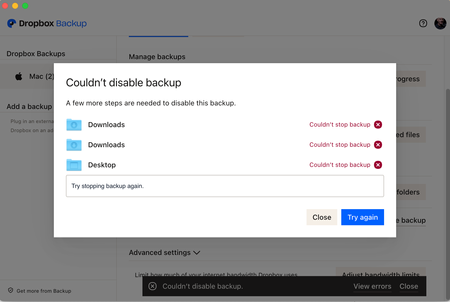
I'm trying to disable backup but getting the error message below. Mac OS 13.2.1 (22D68). Dropbox Beta.
 2 years agoHi Daphne - here is what they suggested. It fixed the issue for me. Good luck.
1) Right-click the Dropbox icon in the system tray, or menu bar, by the clock.
2) Click on your profile picture or initials to the right of the search bar, and select "Preferences".
3) Select the Account tab.
4) Click the "Sign Out" button in the Account tab.
5) Your Dropbox will then prompt you to re-enter your account information.
Your account will then take a few moments to re-index your Dropbox folder, and sync any pending changes before returning to normal activity.
mrylander
2 years agoHelpful | Level 6
Hi Daphne - here is what they suggested. It fixed the issue for me. Good luck.
1) Right-click the Dropbox icon in the system tray, or menu bar, by the clock.
2) Click on your profile picture or initials to the right of the search bar, and select "Preferences".
3) Select the Account tab.
4) Click the "Sign Out" button in the Account tab.
5) Your Dropbox will then prompt you to re-enter your account information.
Your account will then take a few moments to re-index your Dropbox folder, and sync any pending changes before returning to normal activity.
1) Right-click the Dropbox icon in the system tray, or menu bar, by the clock.
2) Click on your profile picture or initials to the right of the search bar, and select "Preferences".
3) Select the Account tab.
4) Click the "Sign Out" button in the Account tab.
5) Your Dropbox will then prompt you to re-enter your account information.
Your account will then take a few moments to re-index your Dropbox folder, and sync any pending changes before returning to normal activity.

Greensandz
2 years agoHelpful | Level 6
Thank you
I’ve made progress but I did something weird
Thank you again for sending the information!
Have a nice weekend
I’ve made progress but I did something weird
Thank you again for sending the information!
Have a nice weekend
About Settings and Preferences
The Dropbox Community is here to help if you have questions about your account settings and preferences. Learn and share advice with members.
The Dropbox Community team is active from Monday to Friday. We try to respond to you as soon as we can, usually within 2 hours.
If you need more help you can view your support options (expected response time for an email or ticket is 24 hours), or contact us on X, Facebook or Instagram.
For more info on available support options for your Dropbox plan, see this article.
If you found the answer to your question in this Community thread, please 'like' the post to say thanks and to let us know it was useful!


