We're making some changes to the Dropbox Community 👩💻 - Find out more here.
Forum Discussion

sim77
2 months agoNew member | Level 2
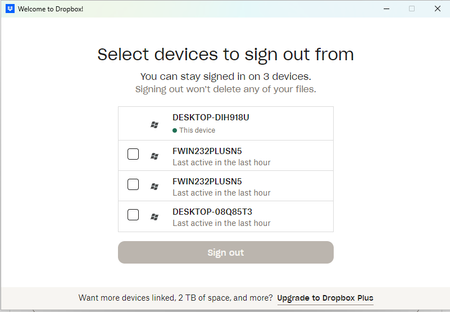
Dropbox is showing that I use 4 devices, but one device is shown twice.
I've just set up a new device, and now Dropbox is not letting me sign in to my regular device because it says I am connected to 4 devices. In fact it's only 3, and Dropbox is showing one device twice...
 2 months ago
Nothing like that, just a tablet.
I signed out of the two duplicates, and then had to reinstall Dropbox on the tablet. A pain, but it's ok now.
sim77
2 months agoNew member | Level 2
Nothing like that, just a tablet.
I signed out of the two duplicates, and then had to reinstall Dropbox on the tablet. A pain, but it's ok now.
- Theresa2 months ago
Community Manager
Hi sim77 and welcome to the Dropbox Community - it's great to have you here.
I am glad to see your issue is resolved now! Thank you so much for coming back to update the thread - it helps others if they are running into the same issue.
By the way, I'm Theresa 👩💻, one of the community managers here at Dropbox HQ. Since you've been using Dropbox across multiple devices, I'd love to know..how do you usually use Dropbox? I am always so curious to hear how people fit Dropbox into their daily lives.
Looking forward to hearing more,T 😺 (Dropbox Community Manager)


About Settings and Preferences
The Dropbox Community is here to help if you have questions about your account settings and preferences. Learn and share advice with members.
The Dropbox Community team is active from Monday to Friday. We try to respond to you as soon as we can, usually within 2 hours.
If you need more help you can view your support options (expected response time for an email or ticket is 24 hours), or contact us on X, Facebook or Instagram.
For more info on available support options for your Dropbox plan, see this article.
If you found the answer to your question in this Community thread, please 'like' the post to say thanks and to let us know it was useful!


