We’re Still Here to Help (Even Over the Holidays!) - find out more here.
Forum Discussion

kenzie2029
6 months agoNew member | Level 2
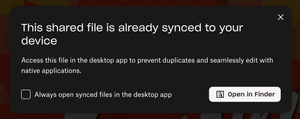
How can I stop the desktop notification pop-up from showing up every time I click on a shared link?
Hello! I use Dropbox daily for work. I use both the online version for reference and the desktop version for everything else. Recently, this pop-up has appeared on my machine, and it's driving me in...

Neal Community Manager
6 months agoCommunity ManagerHi kenzie2029,
The team have implemented a change so that if you click the check box, the message will stop showing in the subsequent share links.
Thanks for letting us know!
About Settings and Preferences
The Dropbox Community is here to help if you have questions about your account settings and preferences. Learn and share advice with members.
The Dropbox Community team is active from Monday to Friday. We try to respond to you as soon as we can, usually within 2 hours.
If you need more help you can view your support options (expected response time for an email or ticket is 24 hours), or contact us on X, Facebook or Instagram.
For more info on available support options for your Dropbox plan, see this article.
If you found the answer to your question in this Community thread, please 'like' the post to say thanks and to let us know it was useful!


