We’re Still Here to Help (Even Over the Holidays!) - find out more here.
Forum Discussion

B3astieb0y
12 months agoNew member | Level 1
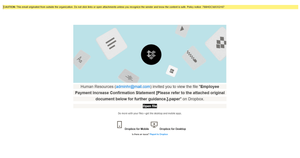
I received an email that might be spam - how can I be sure about it?
Received an email from the no reply dropbox email on my work email in regards to a "Employee Pay Increase Confirmation Statement", but the invite party isn't my companies HR email address. Is this Sp...

Rich Super User II
12 months agoSuper User IIWalter wrote:Can you follow the steps outlined here to confirm if this was indeed sent from an official Dropbox domain or not? If not, you can forward the suspicious email to abuse@dropbox.com and we'll investigate.
Even if it was sent from an official Dropbox domain, send it to abuse@dropbox.com anyway. People use the sharing abilities within Dropbox to send these phishing attempts, and when doing so the messages will come from the official Dropbox domains.
Forward it to abuse@dropbox.com and let your company IT know about it as well. They'll want to search their mail system for other copies. If you received it, chances are others in your company did as well.
About Security and Permissions
Start a discussion in the Dropbox Community forum to get help with your account security and permissions. Find support from Community members.
The Dropbox Community team is active from Monday to Friday. We try to respond to you as soon as we can, usually within 2 hours.
If you need more help you can view your support options (expected response time for an email or ticket is 24 hours), or contact us on X, Facebook or Instagram.
For more info on available support options for your Dropbox plan, see this article.
If you found the answer to your question in this Community thread, please 'like' the post to say thanks and to let us know it was useful!


