Our Community is in read-only mode until April 8th, learn more here. You can still search existing threads or get help via Dropbox Support, the Dropbox Help Center, or Learn.
Forum Discussion

fuserr
2 years agoExplorer | Level 4
Someone opened some old cryptocurrency files on my Dropbox, how?
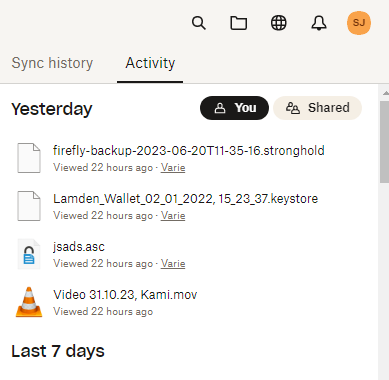
Hello, As you can see from this screenshot, someone opened some files in my Dropbox, all these being old cryptocurrency wallets (there was nothing inside fortunately). If I check from the ...

fuserr
2 years agoExplorer | Level 4
So what other could it be theoretically?
1) A software on my desktop that has access to my synced folders (if I just copy a file it does not show up in the recent activities, so in which case does it show up?)
2) password + 2fa = not an option because there are no more accesses on the log
Again: the 3 files that have been "opened" are all files that have something to do with wallets, this really cannot be a coincidence.
I even had no antivirus software active more than windows defender so I don't know what else could be accessing those files.
Would you mind escalating this issue to a specialist?

Megan Dropbox Community Moderator
2 years agoDropbox Community ModeratorHi fuserr, based on all the checks that you did, it seems that everything is okay.
However, I definitely see where you're coming from, and your need to be extra safe. If you wish, I can open a ticket on my end for you, in order for us to have a closer look into this.
About Security and Permissions
Find answers to your questions about Dropbox account security and permissions.
The Dropbox Community team is active from Monday to Friday. We try to respond to you as soon as we can, usually within 2 hours.
If you need more help you can view your support options (expected response time for an email or ticket is 24 hours), or contact us on X, Facebook or Instagram.
For more info on available support options for your Dropbox plan, see this article.
If you found the answer to your question in this Community thread, please 'like' the post to say thanks and to let us know it was useful!


