Our Community is in read-only mode until April 8th, learn more here. You can still search existing threads or get help via Dropbox Support, the Dropbox Help Center, or Learn.
Forum Discussion

fuserr
2 years agoExplorer | Level 4
Someone opened some old cryptocurrency files on my Dropbox, how?
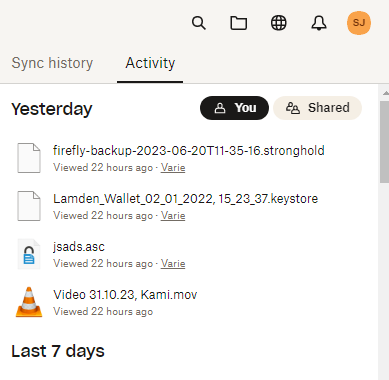
Hello, As you can see from this screenshot, someone opened some files in my Dropbox, all these being old cryptocurrency wallets (there was nothing inside fortunately). If I check from the ...

Megan Dropbox Community Moderator
2 years agoDropbox Community ModeratorHi fuserr, based on all the checks that you did, it seems that everything is okay.
However, I definitely see where you're coming from, and your need to be extra safe. If you wish, I can open a ticket on my end for you, in order for us to have a closer look into this.

fuserr
2 years agoExplorer | Level 4
Dear Megan yes I would like the ticket to be opened thank you
- Megan2 years ago
Hi fuserr, I just sent you an email, and I'll be happy to see you there!
- fuserr2 years agoExplorer | Level 4
hey Megan I didnt receive any email unfortunately
- Walter2 years ago
Hey fuserr - sorry to jump in here, but did you check your inbox and junk/spam folder for Megan's email?
This should have come on this email address.

About Security and Permissions
Find answers to your questions about Dropbox account security and permissions.
The Dropbox Community team is active from Monday to Friday. We try to respond to you as soon as we can, usually within 2 hours.
If you need more help you can view your support options (expected response time for an email or ticket is 24 hours), or contact us on X, Facebook or Instagram.
For more info on available support options for your Dropbox plan, see this article.
If you found the answer to your question in this Community thread, please 'like' the post to say thanks and to let us know it was useful!


