Your workflow is unique 👨💻 - tell us how you use Dropbox here.
Forum Discussion

Wenger777
6 years agoExplorer | Level 4
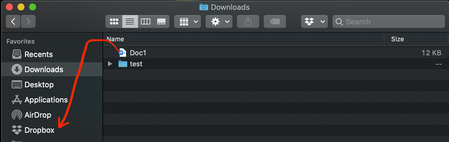
Mac catalinaにアップグレードするとFinder Sidebarでファイルがドラッグアンドドロップできない。
本日Mac Catalinaにアップグレードした所、 FinderのSidebar「お気に入り」に表示されているDropboxフォルダにファイルをドラッグアンドドロップできなくなってしまいました。 User→Dropboxフォルダを直接表示させた場合は、直接ドラッグアンドドロップしてファイルを移動できます。Sidebarのみ、追加できない状態となっています。 アクセシビリティ、フルディスク...
- anonymous6 years ago
下記をお試しください。私は直りました!
ターミナルを開いて下のコマンドを入力▼
IFS=$'\n'; for path in `python -c $'import os\nimport json\nfor key, value in json.loads(open(os.path.expanduser("~/.dropbox/info.json")).read()).items():\n print value["path"].encode("utf-8")'`; do echo "$path"; xattr -d com.apple.quarantine "$path"; done
anonymous
6 years ago私の同様の問題に直面しています。。
解決はできましたか?
About 質問する

他のユーザーのディスカッションで回答が見つかる場合があります。回答が見つからない場合は、新しく質問してください。
The Dropbox Community team is active from Monday to Friday. We try to respond to you as soon as we can, usually within 2 hours.
If you need more help you can view your support options (expected response time for an email or ticket is 24 hours), or contact us on X, Facebook or Instagram.
For more info on available support options for your Dropbox plan, see this article.
If you found the answer to your question in this Community thread, please 'like' the post to say thanks and to let us know it was useful!


