Your workflow is unique 👨💻 - tell us how you use Dropbox here.
Forum Discussion

bcdenman
2 years agoExplorer | Level 4
Dropbox Sign Template Links
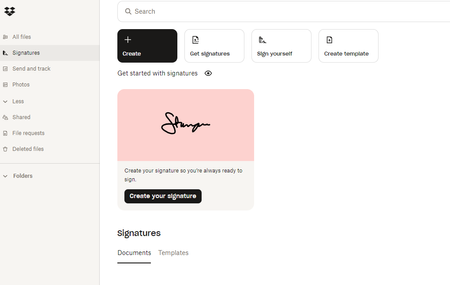
I'm on a Trial of the Essentials plan. I can't find any place in the Interface to create a Template LINK (creating a Template no problem). The UI I have access to seems different than what is des...
- 2 years ago
Hey wjwtproperties, after looking into this further with our team, we just wanted to let you know that we do not currently support template links from within dropbox.com.
Template links are available to Dropbox Sign users on Essentials, Standard, and Premium plans.
This means that you would need a direct Dropbox Sign subscription to be able to use template links and access the Sign website, e.g. Dropbox Sign Essentials, not Dropbox Essentials.
I hope this clarifies things.

bcdenman
2 years agoExplorer | Level 4
Thanks for getting back to me. When I try to login via the link/page you shared, it forces me back into Dropbox-->Signatures. I can't seem to find any way to login to HelloSign more explicitly.
How do I create a Dropbox Sign account that isn't also an overall Dropbox account so I can get to the native Sign interface and the feature I'm after?

Hannah Dropbox Community Moderator
2 years agoDropbox Community ModeratorHey bcdenman, have you tried the steps in this article?
About Dropbox Sign

Ask questions and get help with Dropbox Sign here.
The Dropbox Community team is active from Monday to Friday. We try to respond to you as soon as we can, usually within 2 hours.
If you need more help you can view your support options (expected response time for an email or ticket is 24 hours), or contact us on X, Facebook or Instagram.
For more info on available support options for your Dropbox plan, see this article.
If you found the answer to your question in this Community thread, please 'like' the post to say thanks and to let us know it was useful!


