We’re Still Here to Help (Even Over the Holidays!) - find out more here.
Forum Discussion

Peter H.87
3 years agoCollaborator | Level 10
Dropbox app misbehaves when changing monitor setup
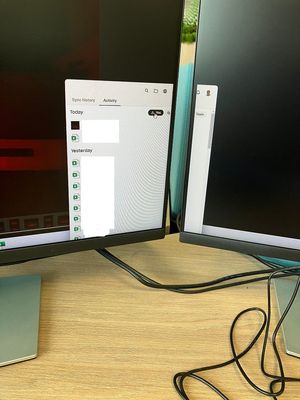
I have a laptop which I sometimes use standalone and sometimes at my desk plugged into twin monitors. If I boot up standalone and then later move to the desk then the DB app doesn't account for this...

Peter H.87
3 years agoCollaborator | Level 10
OK, I reinstalled but that did not make any difference.
Also possibly relevant is that the scaling is set at 125% on the laptop screen but 100% on the external monitors.
Peter H.87
3 years agoCollaborator | Level 10
FYI I can also reproduce this just on the laptop screen; if I change the scaling from the default 125% to 100% the same thing happens.
I've found a work-around - go to the shortcut (C:\ProgramData\Microsoft\Windows\Start Menu\Programs\Dropbox), right click for Properties, go to Compatibility, go to High DPI Settings, check "High DPI scaling override, override high DPI scaling behaviour. " and choose "Scaling performed by: System".
- Megan3 years ago
Dropbox Community Moderator
Hi Peter H.87, thanks for letting us know more about your findings!
If you need anything else, I'll be one post away, cheers!
- Peter H.873 years agoCollaborator | Level 10
Megan wrote:Hi Peter H.87, thanks for letting us know more about your findings!
If you need anything else, I'll be one post away, cheers!
I was sort of thinking you might fix it?
 BenDBX3 years ago
Community Manager
Hi Peter H.87
Thanks for bearing with us while I checked in with our engineering team about your issue. The scaling problem could be a function of resolution. As a first troubleshooting step, you may consider adjusting your resolution to see if this problem persists.
If you are still experiencing this scaling problem, let me know and we can investigate this as a possible bug.
Regards,
Ben

About Apps and Installations
Have a question about a Dropbox app or installation? Reach out to the Dropbox Community and get solutions, help, and advice from members.
The Dropbox Community team is active from Monday to Friday. We try to respond to you as soon as we can, usually within 2 hours.
If you need more help you can view your support options (expected response time for an email or ticket is 24 hours), or contact us on X, Facebook or Instagram.
For more info on available support options for your Dropbox plan, see this article.
If you found the answer to your question in this Community thread, please 'like' the post to say thanks and to let us know it was useful!


