Your workflow is unique 👨💻 - tell us how you use Dropbox here.
Forum Discussion

liyi
1 year agoExplorer | Level 4
After uninstalling Dropbox Dash, I get the error "A JavaScript error occurred in the main process"
hi mike,
I encountered similar startup error message after uninstalling dropbox dash (as printscreen). kindly advise if there's a fix, thanks 🙂
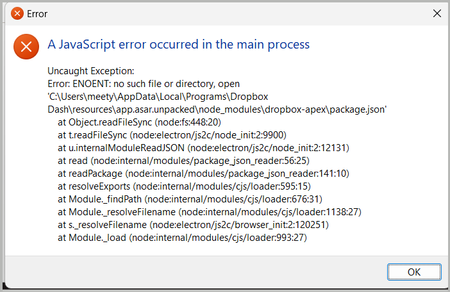
 1 year ago
Hi liyi,
It's possible that there's a background process still running. Since you've disabled Dash as a startup app, try restarting and attempting the deletion again.
Alternatively, you can open Task Manager and look for a Dropbox Dash process running that you can end, then attempt the deletion again.
If this doesn't work, let us know and we can reach out via email to take a deeper look.
Thanks,
Ben

Jay Dropbox Community Moderator
1 year agoDropbox Community ModeratorHi liyi, thanks for bringing this to our attention.
I've moved your post to another thread as it was unrelated to Dropbox Capture.
What is the exact version of Windows that you're running?
Could you let me know the steps you're taking in order to get this error message?
This will help me to assist further!
About Dash Forum

Ask questions and get support on how to use Dash.
The Dropbox Community team is active from Monday to Friday. We try to respond to you as soon as we can, usually within 2 hours.
If you need more help you can view your support options (expected response time for an email or ticket is 24 hours), or contact us on X, Facebook or Instagram.
For more info on available support options for your Dropbox plan, see this article.
If you found the answer to your question in this Community thread, please 'like' the post to say thanks and to let us know it was useful!


