We’re Still Here to Help (Even Over the Holidays!) - find out more here.
Computer Backup
222 Topics
Stop Dropbox from backing up external drive
I made the mistake of accepting a request from Dropbox to back up an external drive plugged into my Mac. I didn't stop to think the files in that drive were going to be huge video files that should NOT be backed up to Dropbox. How do I stop the backup of that external drive? The help section says go to the preferences of the Mac Dropbox app and uncheck folders I don't want to be synced. There is NO such option. The only option is to uncheck something about set up notifications for new external drives. There was another help suggestion that suggested right clicking "the backup" and pausing it. WHAT backup?? I don't see the external drive listed anywhere in my Dropbox folder, and right clicking the external drive icon on my desktop doesn't show any Dropbox options. How do I stop this backup without disabling ALL backups?? Thank you for any help on this....Solved18KViews5likes22Comments
How can I backup an Apple Photos Library to Dropbox?
I use a Mac air and currently my photos library (about 400 GB so far) is stored on 2 external hard drives (which are duplicates of each other). I want to store one copy of my apple photos library on line as a unit (as my third back up). Does anyone know if I can copy an Apple Photos Library directly into DropBox Back up (I don't want to use it to access my photos - just as a pure 3rd back up). Also what is the largest file size that one can back up to Dropbox back up? Many thanks3.5KViews0likes3Comments
My Dropbox is full of backup files that I can't remove.
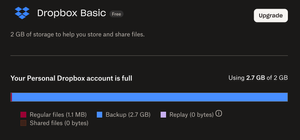
My dropbox claims to be full, but I have no essentially no files on it. When I try to see what's taking up the space, it claims that "Backup" is taking up 2.7gb out of my 2gb of space. But I have no backups, and I have no linked devices. How can I remove these "backups"? What are they backups of? Is there some way I can just "factory reset" my account to just as if I had started a new account, maybe?Solved125Views1like4Comments
I plugged an external drive to my computer, but it's backing up 0% to Dropbox
I've recently signed up with Dropbox Backup and added my external hard drive. I enabled backup for this drive, and selected 'Backup Now' rather than waiting for it to schedule a backup at 9am tomorrow morning. Since doing so the drive remains at 90-100% usage, but not a single file has been uploaded in over 4 hours. It shows 0 bytes transferred in the Dropbox app. How do I get it to do it's job and actually start the backup?1.2KViews1like14Comments
Syncing Documents and Downloads folders across multiple macOS devices
I have used Dropbox for years to sync the Documents and Downloads folders of my home, office, and travel Macs (i.e., I can work on any of the three machines at anytime and they are all synced). Last year, I discovered that I heed to use symlinks to do this on a new office machine and so far, it seems to be working. Today I am setting up a new MacMini at home and am trying to figure out how to set up syncing again. I installed Dropbox and files were added to the new Mac, but the Dropbox folder is in my user library, and an alias (or symlink) to my Dropbox appears in my user folder. Clearly something has changed in Sequoia compared with earlier OSs. Can someone share the terminal code that I need to replace the Documents folder on my new Mac with a symlink pointing to the Documents folder in Dropbox?142Views0likes5Comments
Access Dropbox Backup on Mobile?
New Dropbox customer here. I've signed up for Dropbox backup, and looking to use it to fully replace my Backblaze account. Is it possible yet (or planned) to access the Dropbox backup files from the mobile? Or should I just put everything into the Dropbox folder if I prefer that? Thanks749Views1like3CommentsI see a grey X next to my Windows files and they can't be opened after disabling computer backup
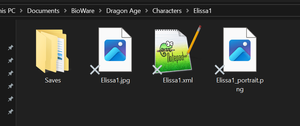
Hello! I used to use the backup feature of Dropbox for my computer. Notably, this included my Documents folder (on Windows 10). At some point I turned off the backup feature because I thought I didn't need it any more. I thought this would stop the integration with my computer gracefully, but it seems that now many of my files in my Documents folder are no longer accessible, as if they were made online-only (but there is no longer an online version backing them). Some screenshots attached. The problem files appear with a grey X on the bottom left of the icon. If I try to open them, I get failure and an error message sometimes depending on the program trying to open it. I do not have OneDrive, which is the usual cause I see online for the grey Xs. How can I get my files working again? grey Xs on files that cannot be openedgrey Xs on files that cannot be opened what happens if I try to open a text file with an X using notepad++what happens if I try to open a text file with an X using notepad++9KViews0likes12CommentsUpload versus back-up?
I know the difference between uploading a file and backing up one. But....when I upload a folder from my desktop into Dropbox it is still present on my desktop. The same is true when I backup a folder. This makes me wonder about the difference between the two.Solved371Views0likes8Comments