Your workflow is unique 👨💻 - tell us how you use Dropbox here.
Dropbox Business
639 Topics
External users cannot upload to a shared folder they have edit access to
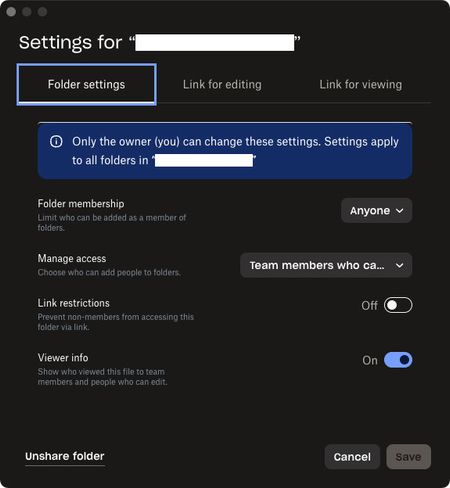
Been trying to get this to work for many years but always give up and use a different service. On my company’s team dropbox I want to create a folder with the purpose of collaborating with outside vendors. I can create invites, confirm access with edit permissions for the outside person, and they can join no problem, but they only ever have download permissions and can’t upload anything to our folder. Am I missing some permission setting? The other method of using a File Request for them to upload something does work but isn’t ideal. These are the settings used for the most recent attempt:178Views0likes4Comments
Feature Request: Support Multiple Dropbox Business/Teams Accounts (Multiple Tenants) in Desktop App
Hi Dropbox team — I’m posting this as both a long-time Dropbox user and a business owner. Today, the Dropbox desktop app only allows seamless use of one Business (Teams) account (plus optionally one Personal account). This creates a major problem for users who legitimately operate across multiple organizations. Real-world use case Many professionals today are involved with multiple companies at the same time, including: Business owners with multiple entities Holding companies with multiple subsidiaries Consultants / advisors supporting multiple clients Board members and fractional executives PE / investment professionals working across portfolio companies In these cases, we often need separate Dropbox Business tenants for security, compliance, and clean separation. The key point I am not asking for a workaround or a discount. I am willing to pay for multiple Dropbox Business subscriptions — but Dropbox currently does not provide a seamless way to run multiple Business accounts in the desktop app. What competitors already support Microsoft OneDrive/SharePoint supports multiple tenants cleanly, for example: OneDrive – Company A OneDrive – Company B Both sync simultaneously and appear natively in File Explorer/Finder. Dropbox currently forces users into clunky workarounds like: Using the browser for the second tenant Switching accounts repeatedly Creating separate OS user profiles Running virtual machines These are not realistic solutions for modern workflows. Why this matters This limitation is not a “nice-to-have.” It is a core enterprise usability issue and increasingly a deciding factor for businesses choosing between Dropbox and Microsoft 365. Dropbox is losing a valuable segment of customers who are willing to purchase multiple accounts — but cannot do so efficiently due to desktop client limitations. Requested solution Please add support for: Multiple Dropbox Business/Teams accounts logged in simultaneously Separate synced folders per tenant Seamless switching and visibility in Finder/File Explorer Clear tenant labeling and separation Even supporting 2+ Business tenants would solve a massive problem for many professionals. Bottom line Dropbox is an excellent product, but this is a fundamental gap. Many of us want to keep using Dropbox and expand our usage across multiple businesses — but we need Dropbox to support the reality of multi-tenant work. Thanks for considering this — I would strongly encourage Dropbox to prioritize this feature. Edward Cook Co-Founder, McCarthy Cook & Co. We were the first landlord of Dropbox's HQ at China Basin in SF and owner of Castro Station in Mountain View where you used to work. Come back to the office! You will be closer to your PAYING customers! I'm happy to double the amount we pay you monthly for new and better access and continue with Dropbox while you pursue true productivity gains harnessing AI44Views1like1Comment
I'm unable to add any new licenses to my team
Hi, I already have 48 licences. I need to invite more members / add more licences. it is not allowing me to add more licenses and keep giving me below errors: "Something went wrong on our end. Close and try again." or "Failed to load pricing information" Any help would be appreciated. Ticket id already raised = 2606894526Views0likes1CommentTell Us How You Use Dropbox
No two people use Dropbox in exactly the same way. Some of you rely on it every day for work, others for school, creative projects, or keeping life organized - and we love that. We’d love to hear how you’re using Dropbox today - is it something you use once in a while, is it part of your day to day, are there any features you can’t live without? What workflows have you built that save time or reduce friction? And where do you see opportunities for us to do better? Your tips, ideas, and honest feedback really help us to make sure we can share useful tips, and they help other community members discover new ways to get more out of Dropbox too. Share your experience, favorite features, or suggestions in the comments below. Your voice truly helps shape the future of the Dropbox community 😁 The Dropbox Community Team2.1KViews3likes11Comments
How can I unlink a Dropbox Business account if I can no longer access this work account?
Good morning, I am using the Dropbox Desktop app and I would like to link my new Business Dropbox. Unfortunately, my previous' employers business Dropbox is still linked, but I can no longer sign in to this account to unlink it. Is there a work around that does not require me to sign in to my old business dropbox? Thank you!45Views0likes2CommentsAfter upgrade to Dropbox Teams, I have 2 Dropbox accounts or at least 2 Dropbox folders.
Dropbox Plan Dropbox Business upgraded to Dropbox Teams Device Dell XPS 16 Operating System/Browser (if using the web) Windows 11 Pro Dropbox App Version (if using the app) 240.4.8609 Question or Issue I had a Dropbox business account that was 6TB. I ran out of room so I upgraded to Dropbox Teams and 15 TB. I just figured that my Dropbox business account would become the Dropbox teams account but it did not. Now I have 2 Dropbox accounts (or at least 2 Dropbox folders) with 2 different names but using the same email address. I only want one account with 15 TB of room. Question: How can I get all my files over to the Dropbox Teams account? Question: At renewal time, does this mean I will be charged for the Dropbox Business account and again for the Dropbox Teams account?58Views0likes2Comments
I can't add a team member to a folder, and having issues contacting Support in order to get help.
Hello Community Ive been with DROP BOX for over 15 years. Ive reached my limit and cannot stomach the owners of DB anymore. Fleecing small business is not admirable. Creating confusing menus to generate more revenue aimed at small business owners who cannot manage these complicated systems. I initially signed up for DB as a storage tool but realized you cannot rely on DB for storage as files are constantly lose however ive been able to use the the platform as collaborations tool. However the platform has become a cess pool of dishonest practices. I pay thousands of dollars per year you would think i could have access to support? You want me to explain to you all these error messages. The platform is purposely deceptive in order to upsell. These practices are making people like Drew Houston more money and are contributing to working class peoples misery. I have a small business im paying enterprise rates yet i dont have access to support (which i bought the add on). I cant add a team member to a folder says im not the owner but i am the owner i cannot contact support despite paying $3k per year. This platform is awful. Someone tell me a good alternative please for the love of GOD117Views0likes4CommentsError when trying to create a top level folder from my local Dropbox folder
This is still going on? I cannot create a top level folder through Windows file explorer, even though I am the owner of the account? People have been bitching about this for at least a year. Logging in to the website just to create a folder is cumbersome and aggravating. It used to work through explorer, why did that change? You should change it back, it doesn't seem like it would be difficult and would result in fewer complaints and possible departures to other cloud options.
I no longer see the "anyone with link to view" option for shared links on my Dropbox team.
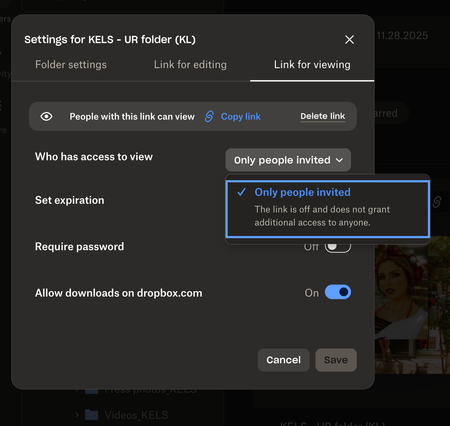
Help! I feel like I am going crazy trying to figure this out. I have a business account and recently have had trouble creating links so that anyone with the link can view. This is a new issue and one I haven't had before. It used to be so easy to create folders and links to share easily with colleagues but not no matter where I look, I am not seeing that option anyomore. It only gives me the option to invite individual people to view/edit the folders I am creating. Is there something I missing or a restriction I mistakenly added to my account? I'd rather "anyone with the link to view" be my default than it be protected as 90% of the time I want to create links that are easily shareable and viewable. See attached screenshot. Is anyone else having this issue as of late? Thanks in advance for any help you guys can provide!94Views0likes3Comments
I pay for support but not receiving any support
Question or Issue Used callback request, and I get this: "You are being helped by Dropbox Support." What does this mean? It's been over two hours. After twenty years, I guess I have to move on. I lose work when I can't get people their files.85Views0likes4Comments