We’re Still Here to Help (Even Over the Holidays!) - find out more here.
File access
507 Topics
Quicken toggle
Quicken doesn't like to share files, so I have to remember to pause dropbox before using it. I'd like to create a quicken shortcut that automatically pauses dropbox then continues when I exit. Is there some kind of switch or batch file I could use to accomplish this.8Views0likes0Comments
Manually disable folder shareability for sensitive information
So the use case is based on the desire of having sensitive information on Dropbox and eliminating the possibilty of accidentally sharing it with someone. The idea is for an option to manually turn off shareability of a folder. That way I dont accidentally create a link in a flurry and send our finances to a customer. There are other cloud services I could use that do this just for that information but who needs more passwords to remember.12Views0likes0Comments
Issue deleting a large number of files
Hi there. Sorry if a topic like this has already been made, but I require some assistance. See, I play a lot of PC games, but for some reason, Dropbox, or my computer, downloads any images that are seen in the game and has it saved here on Dropbox, which I absolutely do not need. When I saw that I went over the necessary amount of file storage, I tried deleting all of the images in my account, but it says its unable to. I don't know if its because there are so many files, or because of something else. If someone can show me an effective way to delete all of the files/image I have, or better yet, have Support or an Admin do it, I'd be greatly appreciative.58Views0likes3CommentsI can't see files that were shared with me in my account
Device (Asus Laptop) Operating System/Browser (if using the web) (Windows 11) Syncing Status ("Up to date") Question or Issue Please help me, my boss has a shared files with me and I cannot see it on my end but with her its there, I'm using dropbox webpage only. I followed the articles with firewall and its all fine. Please help me resolve this issues please.24Views0likes2CommentsFolder shortcuts to other drop box locations inside of share folders
I would like to create a public share folder called something like "Company Information" Then I would like to create individual folders that will be perpetually able to be downloaded by a customer using a QR code or link with their information in it. I would like a way to link the public share folder inside of the individual folder so that they can access it by clicking the link to their folder then navigating to it with some sort of short cut. This allows me to have 1 up to date location for all company information long term without updating it in every folder.18Views0likes0Comments
Dropbox syncing online-only files when a third-party app tries to access a synced folder on Windows
Operating System/Browser (if using the web) (Windows 11 and Windows 10) Dropbox App Version (if using the app) (238.4.6075) Question or Issue This problem has bothered me for a while, I don't remember since when, but currently whenever I tried to save something into a Dropbox synced folder (such as a Powerpoint file or Word document) on Windows, the dropbox would start to sync all the supposedly online-only files within the folder and the syncing is really really slow. Most importantly, the syncing process would freeze the entire Save-As dialog and nothing can be done before the syncing is finished. This is not just limited to MS Office, but also other apps as well. Directly access the folder through Windows Explorer is OK. I am not sure if this is an Windows issue or a Dropbox issue. I suspect accessing the folder through an app other then Windows-Explorer would trigger Dropbox to believe you are trying to access all the files in that folder. I have updated Dropbox app to the newest version as suggested by support. And it happens on both of my desktop PC and laptop PC. Also I'd like to point out that I am accessing Dropbox through a proxy, which may explain the slow-syncing issue. Does anyone have similar experiences?42Views0likes4Comments
Editing PDFs on Dropbox on Android corrupts the PDF
Device TCL NxtPaper 14 Operating System/Browser (if using the web) Android 14 Dropbox App Version (if using the app) 454.2.2 Syncing Status Up To Date Question or Issue I am using Dropbox on my TCL NxtPaper 14, along with the app Nutrient PDF Viewer Pro to edit and annotate PDFs on Dropbox. Whenever I use the app, it corrupts the PDF on Dropbox. Editing PDFs on other cloud services with the same app does not give me any issues.136Views0likes10Comments
I can't move, copy or delete content from within the Dropbox folder on my Windows 11.
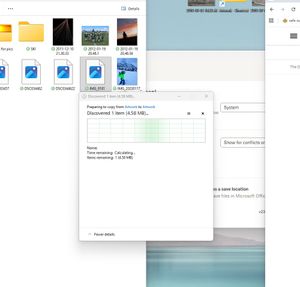
Device My awesome PC Operating System/Browser (if using the web) Win11 Dropbox App Version (if using the app) 238.4.6075 Question or Issue We have old/historical jpeg/photos on drop box. I am having trouble moving, copying, pasting individual photos. When I try to move, copy, delete it seems to get stuck on the attached system process -> Windows says calculating, but doesn't seem to progress further. I also cannot see a preview of these files in the thumbnail/folder, they are just blank, though newer files in the same folder do have the preview image. I am trying to move bulk files though I cannot even move individual files ATM. Its only old files that we've not opened/viewed for years. Any ideas?23Views0likes2Comments
Exportable & Editable Folder Map
As Dropbox accounts grow over time, folder structures become complex, deeply nested, and hard to manage. Currently, I can view their folder hierarchy in the web UI, but I cannot export it, nor can I reorganize folders at scale without manually dragging items one by one. This makes large-scale cleanup, restructuring, and collaboration planning unnecessarily time-consuming and error-prone. Introduce a Folder Map feature that allows users to: Download a full folder map: Export the entire Dropbox folder hierarchy (folders only, optional files) maybe like a visual map (mind-map style) Edit the folder map in-app: Reorganize folders by: drag & drop, bulk move / rename, nesting or flattening structures(no files are moved yet: this is a planning layer) Apply changes in bulk: Once confirmed, Dropbox executes the reorganization safely: Shows a preview of changes, highlights conflicts or permissions issues, allows rollback13Views0likes0Comments