We're making some changes to the Dropbox Community 👩💻 - Find out more here.
File access
269 Topics
Did Dropbox change deletion policy after paid plan downgrade?
Hi there ) Dropbox changed deletion policy after paid plan expiry? Need clarification I’m really concerned about what seems to be a major Dropbox policy change. My Dropbox Plus 2 TB plan expired recently, and my account dropped to Basic. Years ago, Dropbox support told me that after a paid plan expired, files would still be kept for up to 1 year, even if the account was over the free limit. But now I’m seeing a warning in my account saying: “Some of your files will be deleted in 58 days” and “On May 24, 2026, we’ll need to delete files to bring your account under the limit.” I’m currently using about 1.99 TB, so I’m massively over the Basic limit, but what shocks me is the deletion warning itself. In the past, I was told files would remain stored much longer, even without an active subscription. So now I’m trying to understand whether Dropbox officially changed its policy recently, whether this 58-day deadline is real and final, whether anyone else has received the same warning after a paid plan expired, and whether Dropbox has actually started deleting files from downgraded Basic accounts. The most frustrating part is that once the account becomes free, I can’t even access official support to ask for clarification. I’d really appreciate hearing from anyone who has dealt with this recently.23Views0likes3Comments
Windows cannot find folders revealed by search Dropbox
Device Custom PC - 13th Gen i7, 48GB Ram Operating System/Browser (if using the web) Windows 11 Dropbox App Version/Browser Version 241.4.4795.0 Question or Issue When I search dropbox and then click on a folder, windows cannot find the folder. This is only happening with some folders, not all. This was never a problem prior to the recent update.Solved253Views0likes12Comments
Mapping sync'd folders as drive letters/mapped drives?
Hi. So we use various software that relys on linked external files to be loaded in from other drives - think video editting loading footage, or a CAD software loading in other cad files as an assembly, for example we might reference files from a specific folder on F:\ drive, as well as W:\ drive. And we're working on a d:\ drive. Currently we have been using Boxifier to sync the 3 local drives with folders/files on each between 2 locations, so that both locations can open their local file on their D:\ and the linked files on W and F still link and open correctly. Worked well till recently! With the recent Boxifier "issues" (more likely DB changes that broke it, and its taking an age to fix) I was thinking - Make 3 folders in the root of the Dropbox sync folder (whereever you have set that up), F_Drive, W_Drive and D_Drive. You can then map these drives in both locations to the matching drive letter and put your files on them. You then work/open files from the mapped drives (and never the Dropbox folder), which means any files being referenced load in from the mapped drives - but all the files are really in the Dropbox folder still and syncing as normal. Can anyone see an issue with this? Has anyone found a good solution to this issue? Someone suggested this and said it worked, but I just want to check with the wider community before we drop Boxifer and change over! Thanks, Mark71Views0likes2Comments
Is viewing with download disabled for free accounts?
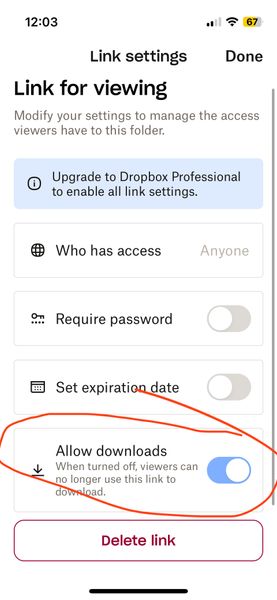
Is viewing with download disabled for free accounts? (I am on a free account) When I go to share (and subsequently generate a link) I now see a mandatory choice of either 1) editable or 2) viewable only. The software defaults to editable (which I think I was inadvertently using for a while and NOT what I want). When I noticed this today, I went to the viewable option instead and then looked at the settings. There are options (see screenshot below) but it seems like the option to have downloads enabled on viewable links is greyed out? But also kind of difficult to tell – it looks lighter blue than normal GUI switches I've seen in the past... It looks like it is on by default but I don't know if it being greyed out means that it is stuck on or that it is not functional (meaning even though its showing as on, the greyed-out-ness means it is actually off AKA no downloads for recipient). Can you please clarify this confusing interface before I send the link? I do not want to send things then recipients say they can't access it. The interface really shouldn't be this confusing. Thanks!Solved49Views0likes2Comments
It's not ideal not being able to search for content using an exact phrase in Dropbox.
Dropbox used to offer the ability to search for an exact phrase. It no longer offers this. It removed it and replaced it with useless garbage. This is completely ridiculous. Everyone should complain and move to another cloud storage service. Their responses have been equally useless. Dropbox should be embarrassed for being 20 years behind the times. FIX YOUR PRODUCT!155Views2likes7CommentsI replaced some subfolders in a folder, but the subfolders are now empty.
Hi all, I uploaded some folders into Dropbox and wanted to share them. The folder to share, consisting of subfolders, appeared too big for some one with a free account. So I replaced the subfolders and share them. Unfortunately the subfolders appeared to be empty after replacement. Any suggestions? Thanks in advance and with KR, Leo.Solved155Views0likes13Comments
Dropbox created new folders with files that can't be opened - unprompted
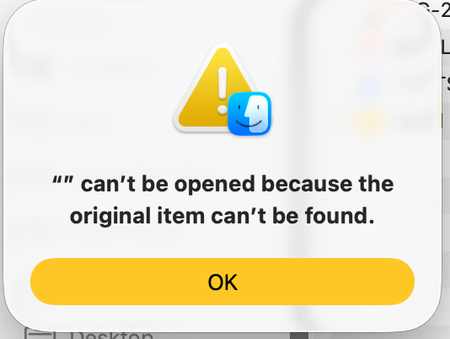
My Dropbox, completely unprompted, moved the location of my folders in Finder under only the Dropbox tab, and at the same time created a significant number of new folders with hundreds of files - none of which can be opened. I was able to find the files I had previously, but I'm concerned that these files and new folders may be either malware or my own files which I no longer have access to. I'd love to understand how to return things back to normal and why this occurred in the first place. I am also unable to open the Dropbox app itself - when I click it it opens up Finder. Solutions from existing forums which cover this issue did not work for me. Thank you. Device MacBook Air 2024 Operating System/Browser (if using the web) macOS26.3.1 Dropbox App Version (if using the app) Can't find, because I can't open the app. This is the error message when I try to open my folders from their previous location in Finder: This is an example of the new folders Dropbox has created: This is what the files inside these folders look like: This is what comes up when I try to open the files in these new folders:81Views0likes5Comments