Your workflow is unique 👨💻 - tell us how you use Dropbox here.
File access
383 Topics
My Dropbox account is out of space. Should I permanently delete some shared folders?
Good day My client shared some of his folders with me, but now I can't access anymore (new year's folders) due to my Dropbox out of storage. I have deleted some of the folders from my Dropbox but still can't access the new folders. It is a problem - I am only viewing the folders - doesn't upload anything. Is there a way to permanently delete the old folders in/on my Dropbox without deleting it on his side?16Views0likes1Comment
Recovering files after a Mac-ScanSnap-Dropbox fumble
This information is not required, but it makes it easier for our Community members and support team to help you. Device MacBook Pro i9 Operating System/Browser (if using the web) macOS Tahoe 26.3 Chrome v145.0.7632.77 Dropbox App Version v243.3.6895 Scanner Snap ix500 ScanSnap Home v2.23.1(2) Question or Issue Deep plumbing alert! I use a Fujitsu ScanSnap ix500 scanner with my MacBook Pro. It appears I may have made the mistake of changing a folder name via Finder when that folder happened to be the ScanSnap Home (SSH) folder, which is the destination folder for scanned documents. That folder is also within Dropbox. For example, the original SSH folder was [Users/me/Dropbox/My Inbox] and the [My Inbox] folder name was changed in Finder to [My Scans]. The name change was done recently, and with plenty of my recovery period remaining. There is no longer any record of files in the now-renamed [My Scans] folder in Dropbox (online or on my device) before the date of the folder name change. There is nothing in the deleted files folder (online or on my device), including a reference to the folder name change, so I am not able to view/restore as I normally would with deleted files. However, the files (or at least thumbnails of) can still be seen in the ScanSnap app but they cannot be accessed, as an error message comes up showing the doc with the old [My Inbox] path is not accessible. Maybe the question is, how can files (20k+ files) get removed from Dropbox without any trace or record of those files ever being there? Any help or insight would be appreciated.
Can recipients of a shared folder link view other recipients of the same link?
I have some large files (several GB each) that I would like to make available to customers to test my company's software. Due to the file sizes, upload/download times can be quite long, and I don't want to chew up my organization's storage space by uploading each file multiple times. So, I'd like to place the files in a single Dropbox folder and share the link with each relevant customer. However, I want to make sure that anyone who I share the link with can't see who else I've sent it to. Recipients of the link may be early in the adoption process and can't be officially "exposed" as customers yet, and our customers may be competitors with each other, so I want to be sure that no one outside my organization can see anyone else who isn't part of either their or my organization. For example: In this folder, I am RK, BC is my colleague, and XH and ZW are employees at one of our customers. However, if XH and ZW weren't colleagues, I would want each of them to only see themselves, RK, and BC as members of the folder. Does this feature exist, and if so, how can I enable it in shared folders? I would want this obscurity to propagate downwards to any sub-folders (and sub-sub-folders) as well.Solved43Views0likes4Comments
Impossible to Restore an External Drive Backup
Dropbox is an absolute joke! If you back up an external drive and that drive crashes, congratulations — you’ve just discovered that Dropbox “Backup” is basically useless. You cannot restore the backup to a new drive. Let that sink in. A backup service that can’t restore to new hardware... Yeah, funny, I know. Your only option? Crawl to the web interface like it’s 2005 and manually download your own data. And it gets worse: you can’t even download large folders. Try it and you’ll be slapped with “too many files” or ZIP limit errors. So instead of restoring a drive, you’re forced to download a few folders at a time, over and over, for thousands of folders. Absolute insanity. - Easy for Dropbox support clowns to say, just do it in small batches... Right. You do understand that some of your clients have subfolder within subfolders where some of those folders have large volumes of data? Oh, duh, just download one folder at a time. OK Dropbox Support Hero, how do I reliably rebuild all this manual intervention without accidentally losing valuable data? Come on guys! You should have a restore drive option that mirrors the data on your useless server with the new drive. Dropbox Backup is not a backup service — it’s a data hostage situation. It’s fine for a couple of documents, but if you trust it with real data, you’re asking for pain. I paid for 2TB and got a masterclass in how not to design a backup product. If you value your time, your sanity, or your data: stay far away from Dropbox Our company has almost 40 team members, we are ALL moving to Google Drive the moment our paid subscriptions end.146Views0likes6Comments
Windows cannot find folders revealed by search Dropbox
Device Custom PC - 13th Gen i7, 48GB Ram Operating System/Browser (if using the web) Windows 11 Dropbox App Version/Browser Version 241.4.4795.0 Question or Issue When I search dropbox and then click on a folder, windows cannot find the folder. This is only happening with some folders, not all. This was never a problem prior to the recent update.Solved89Views0likes7CommentsDocuments are just missing but I didn't delete them
I'm on a Windows PC with a laptop as well as a laptop and iPhone. I have a lot of documents, and something has happened where my documents literally have been deleted. I can't find a version control on missing documents. These are documents I would not have deleted because I use them in knowledge bases in my custom GPTs, and they're still there. Any help would be greatly appreciated. I know I'm being pretty generic, but I'm at a loss right now.58Views0likes6Comments
Files simply gone without any mention of them anywhere in the account
have used Dropbox for years - have thousands and thousands of files from past company photoshoots and various creative assets. Files that cost more than a pretty penny to produce. We are in those folders on a monthly (if not weekly) basis. Then - nothing. Gone. The folders still exist, but no files are showing in the folders. Nothing in the file history, events log, or replay. They are simply gone without a trace. Chat bot keeps telling me to email the latest event from the log to support team, but there is ZERO events related to those folders? And the links provided by the bot to reach out to support simply take me back to the AI chat bot. And around and around we go. with no solution, answers or files.56Views1like3CommentsI can't open a folder shared with me; it appears grayed out on the Dropbox website.
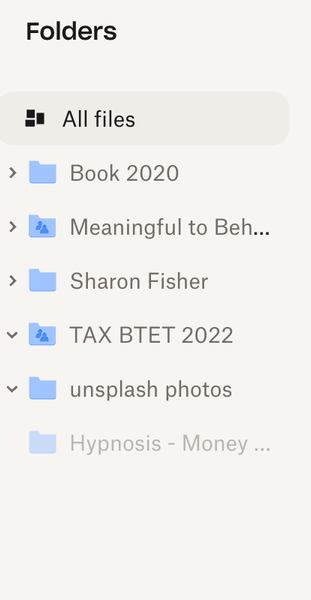
Device mac Book Air Operating System/Browser (if using the web) Chrome Syncing Status I have no idea how to check this Question or Issue I'd like to access the Hypnosis -Money folder--it is a MP3 shared with me but I can't --as you can see it is shaded out. Not clickable. Thanks!50Views0likes3Comments