Your workflow is unique 👨💻 - tell us how you use Dropbox here.
Shared links
914 Topics
I have an xml file which i share with my own smart TV app, but it doesn't work.
Hi, long time no see..well something happend today..because this problem occur again. I have an xml file which i share with my own smart TV app, but it doesn't work. | The Dropbox Community What have you done different today? Or excactly 5 hours ago..103Views0likes10Comments
I can't share any links - Dropbox says my files contain phishing content.
Dear Dropbox Support Team, I’ve received a notification stating: “We have suspended your activity. Your files may contain phishing elements.” I’m unsure why I received this message, and it’s severely impacting my Dropbox experience. It's not specific to any one file. I cannot get the link to share ANY of my files. I always get the same error message when I try to share via the web portal. When I use my PC based Dropbox, I don't get any messages, but I cannot copy and paste any links. I've already spoken with the chatbot and emailed support (over a week ago - ticket id: #26002781) and have not received a reply. Please provide further details so I can resolve this issue promptly. Thank you for your support. Best regards, Tal Device (Razor Blade 15) Operating System/Browser (if using the web) (Windows 11/Chrome) Dropbox App Version (if using the app) (242.4.5815) Syncing Status ("Up to date")25Views0likes2Comments
Can recipients of a shared folder link view other recipients of the same link?
I have some large files (several GB each) that I would like to make available to customers to test my company's software. Due to the file sizes, upload/download times can be quite long, and I don't want to chew up my organization's storage space by uploading each file multiple times. So, I'd like to place the files in a single Dropbox folder and share the link with each relevant customer. However, I want to make sure that anyone who I share the link with can't see who else I've sent it to. Recipients of the link may be early in the adoption process and can't be officially "exposed" as customers yet, and our customers may be competitors with each other, so I want to be sure that no one outside my organization can see anyone else who isn't part of either their or my organization. For example: In this folder, I am RK, BC is my colleague, and XH and ZW are employees at one of our customers. However, if XH and ZW weren't colleagues, I would want each of them to only see themselves, RK, and BC as members of the folder. Does this feature exist, and if so, how can I enable it in shared folders? I would want this obscurity to propagate downwards to any sub-folders (and sub-sub-folders) as well.39Views0likes4CommentsStatic link with shares that update daily
I need to be able to set a static link on shares that are modified daily. I have a program that automatically updated these shares daily and I now find that the share link also changes with the modification. This constantly changing link is very counterproductive and a hindrance to have to resend the links every time the file contents are modified. These files are always the same name and should not be subjected to a link change. How do I set a static link for files stored in Dropbox, or do I just have to use another cloud service?31Views0likes1CommentDifficulty accessing shared files due to mandatory admin verification code.
Recently, access to shared files started requiring an extra verification code from the admin every single time. Before, opening the shared link from email was enough and things worked smoothly. Now it adds unnecessary delays, especially when the admin isn’t immediately available, and it makes the process frustrating for less technical users. If there’s a way to disable this requirement or simplify access again, I’d really appreciate the guidance.40Views0likes2CommentsIs there a way to keep the same link for an updated file?
Hi all, I have a PDF presentation I constantly update, after I've shared the link with clients. But I want the same link to keep working for them. One workaround I sometimes use is sharing the containing folder (and updating the file inside) but many people find this confusing. Is there a way to keep the same link for an updated file? Thanks, Federico40Views0likes2Comments
"Public links have been temporarily suspended for generating excessive traffic." Please help!
I outsource my work on dropbox (six videos appearing on my portfolio website) and make my content available to a number of individuals that need access to it. I am currently unable to share my links anymore due to: "Public links have been temporarily suspended for generating excessive traffic." In the mail, if I click on cancel the suspension, it says I have been banned. I really urgently need my files to be accessible. I think this "high traffic" issue ONLY emerges in the moment in which I am personally updating my website, because I need to control the visual output for a longer period of time (yesterday I worked on it for one hour for instance). Videos go in loop in the meanwhile, so the traffic caused by my personal visualization in the moment in which I am modifying the website is not something I can change. But still, it is something that happens once every six months. I am not violating the traffic rules otherwise (with the normal external daily use of my content). It is not due to external people streaming my content...... Please help me:)47Views0likes3Comments
Displaying HTML links as raw code. Is there a workaround?
It seems that when you sent a link to an HTML file, whereas I can view it just fine, nobody else can, they get raw code. I understand that this was a deliberate policy. So, is there a workaround? Is there a link to a download possible? If I myself want to download it's fine, but what about others?Solved83Views0likes4CommentsRemove login popup when sharing a link to download
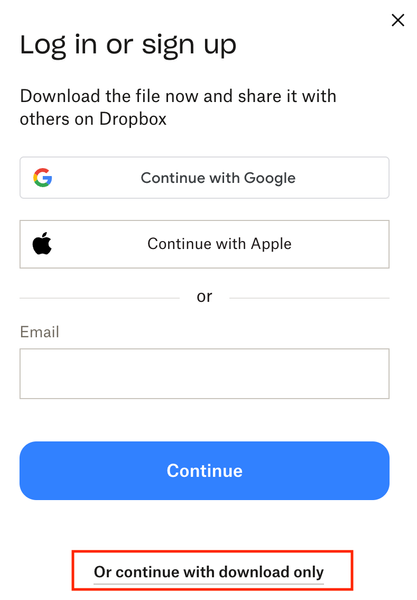
Remove this very frustrating sign in popup. We're all getting sick of our customers and clients asking "can you give me access" or "we dont have a dropbox login" or "can you share it with XYZ" USERS: please like this post so dropbox considers listening. We're paying customers, stop using us as marketing to get more people to sign up. This is the reason we're looking at Sharepoint as an agency. 1 - turn it off 2 - or add a setting to turn it off for PAYING customers 3 - stop locking the topics about it: https://www.dropboxforum.com/discussions/101001014/remove-loginsignup-dialog-box-from-shared-link-download/757059 https://www.dropboxforum.com/discussions/101001012/remove-log-in-or-sign-up-popup-when-downloading-from-a-shared-link/775697 https://www.dropboxforum.com/discussions/101001012/disable-banners-and-popups-for-shared-folders/843215 https://www.dropboxforum.com/discussions/101001014/remove-loginsignup-popup-window-from-dropbox-transfer-link/767931 Remove Login/SignUp dialog from download flow when sharing link to files | The Dropbox Community https://www.dropboxforum.com/discussions/101001014/my-clients-need-to-download-files-via-link-but-the-download-button-isnt-really-v/845332 https://www.reddit.com/r/dropbox/comments/1ft6pyo/remove_log_in_or_sign_up_popop_when_downloading/ Bookmark this post as this image above is very handy to send to your customers as support.48Views0likes1Comment